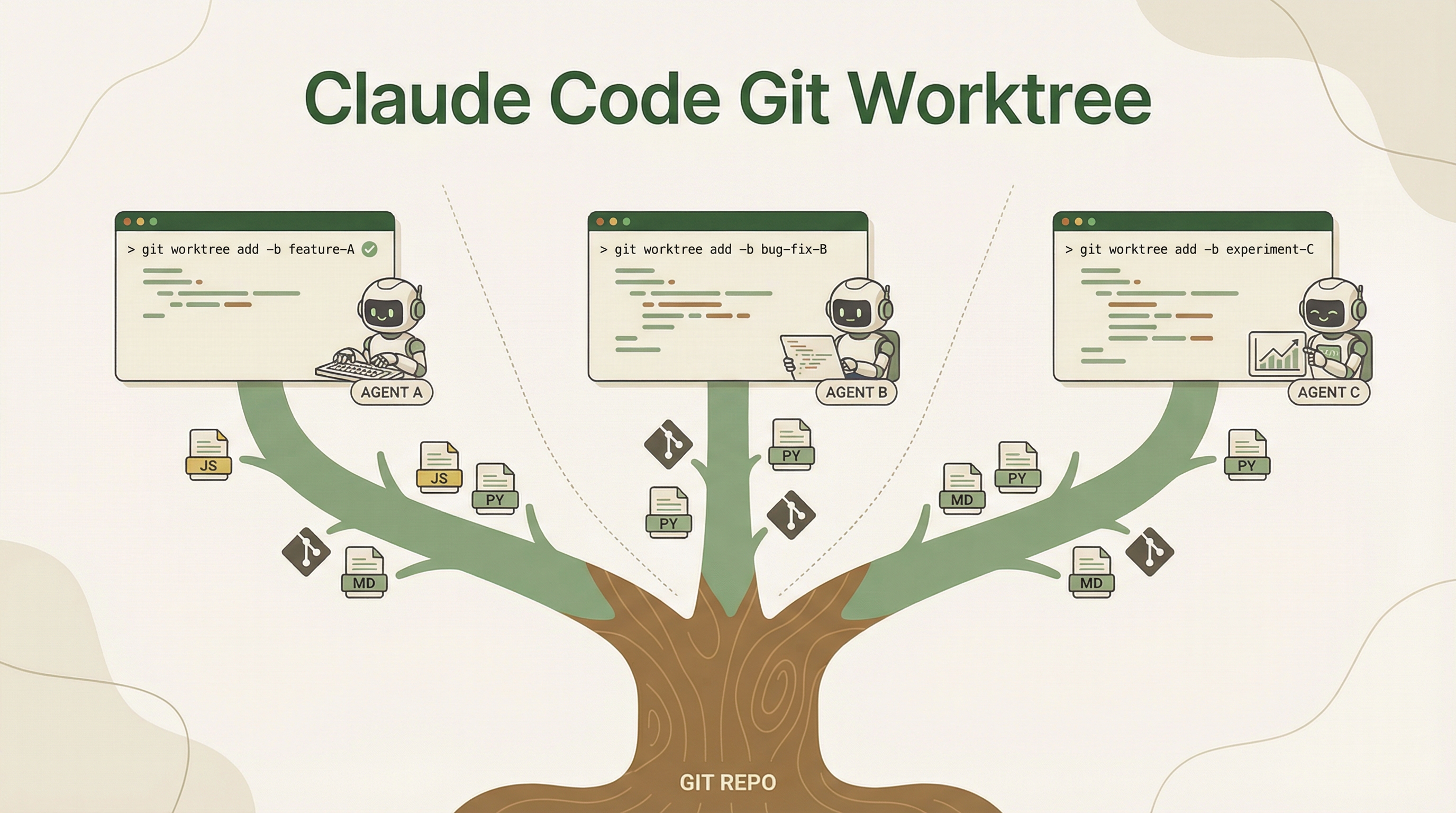
Claude Code now has native Git Worktree support — agents can run in parallel without interfering with each other. Think of it as “opening multiple clones” of your repo, each working independently on different tasks.
Source: Claude Code docs — Run parallel sessions with worktrees
What Is a Git Worktree?
A git worktree lets you check out multiple branches of the same repo into separate directories simultaneously. Unlike git stash or switching branches, each worktree is a fully independent working copy sharing the same .git history.
my-project/              ← main worktree (you're on main)
.claude/worktrees/
  ├── fix-auth/          ← worktree on fix-auth branch
  └── new-feature/       ← worktree on new-feature branch
Each worktree has its own files, its own branch, and its own staged changes. No conflicts.
Ways to Use Worktrees in Claude Code
1. CLI Flag: --worktree
Launch Claude Code with automatic worktree isolation:
# Auto-named worktree
claude --worktree

# Named worktree
claude --worktree fix-login-bug
Claude creates a new worktree in .claude/worktrees/, checks out a new branch, and works entirely in that isolated copy.
2. Inside a Session: Ask for a Worktree
While already in a Claude Code session, just ask:
> start a worktree for the auth refactor
Claude creates the worktree and switches into it.
3. Desktop App: Worktree Mode
In the Claude Desktop app, go to the Code tab and check the worktree mode checkbox. Every task runs in its own worktree automatically.
4. Subagents in Worktrees
Claude can spawn subagents that each run in their own worktree — perfect for large batch changes or parallel migrations:
> Refactor all API endpoints to use the new auth middleware, use subagents in worktrees
Each subagent gets an isolated copy of the repo, makes its changes, and the results can be merged back.
5. Custom Agents with Worktree Isolation
In agent frontmatter, add isolation: worktree to make an agent always run in its own worktree:
---
isolation: worktree
---
How LearnAI Team Could Use This
- Run parallel Claude Code sessions for docs updates, course fixes, and feature experiments without overwriting each other’s local changes.
- Use worktrees for A/B testing different approaches to the same wiki entry or course material.
- Teach students the worktree pattern as a real-world parallel development workflow.
Real-World Use Cases
Example 1: Fix a Bug While a Feature Is In Progress
# Terminal 1: working on a feature
claude --worktree new-dashboard

# Terminal 2: hotfix without touching your feature work
claude --worktree hotfix-login
Both run simultaneously. No stashing, no branch switching, no conflicts.
Example 2: Parallel Code Review + Development
# Terminal 1: reviewing a PR
claude --worktree review-pr-142

# Terminal 2: continuing your own work
claude
Example 3: Large-Scale Migration
> Migrate all 50 API routes from Express to Hono.
> Use subagents in worktrees — one per route group.
Claude splits the work across isolated worktrees, each handling a subset of routes in parallel.
Example 4: A/B Testing Different Approaches
# Try approach A
claude --worktree approach-a
> Implement caching with Redis

# Try approach B
claude --worktree approach-b
> Implement caching with in-memory LRU
Compare both implementations side by side, keep the one you prefer.
Non-Git Users
Not using Git? Mercurial, Perforce, and SVN users can define worktree hooks in their settings to achieve similar isolation:
{
  "hooks": {
    "WorktreeCreate": { "command": "your-vcs-isolation-script.sh" },
    "WorktreeRemove": { "command": "your-vcs-cleanup-script.sh" }
  }
}
Why This Matters
Before worktrees, running multiple Claude Code sessions on the same repo meant they could step on each other’s files. Now each agent gets its own sandbox of the codebase. This unlocks:
- True parallel development — Multiple tasks, zero conflicts
- Safe experimentation — Try risky changes without affecting your main working copy
- Faster batch operations — Subagents divide and conquer across isolated copies
- Clean context separation — Each worktree has its own branch and changes