Topic 6 Targets: make what we made
We made these with Claude Code: our example picture, then the poster, the deck and the animation you make in class. Your job: get Claude Code to make each again, first in words only, then with the picture, and see how close you get. Then look at the exact prompts we used.
How this works
- Round 1, words only. A new, empty folder; describe what you see. No pictures yet.
- Score it. Open the five features and tick the ones your version matches.
- Round 2, with the picture. Send the Round 2 prompt, then score again.
- See how we made it. Compare our prompts with yours: which words got you closest?
Rules: Claude Code only, on the course plan every student has. Build it from shapes and real text. Never put our picture itself into your file. Nothing private in a prompt. Practice: nothing is graded and nothing is submitted.
Target 1 · The synthwave Study Night picture
Our example, Thursday 10/15 · how we made it
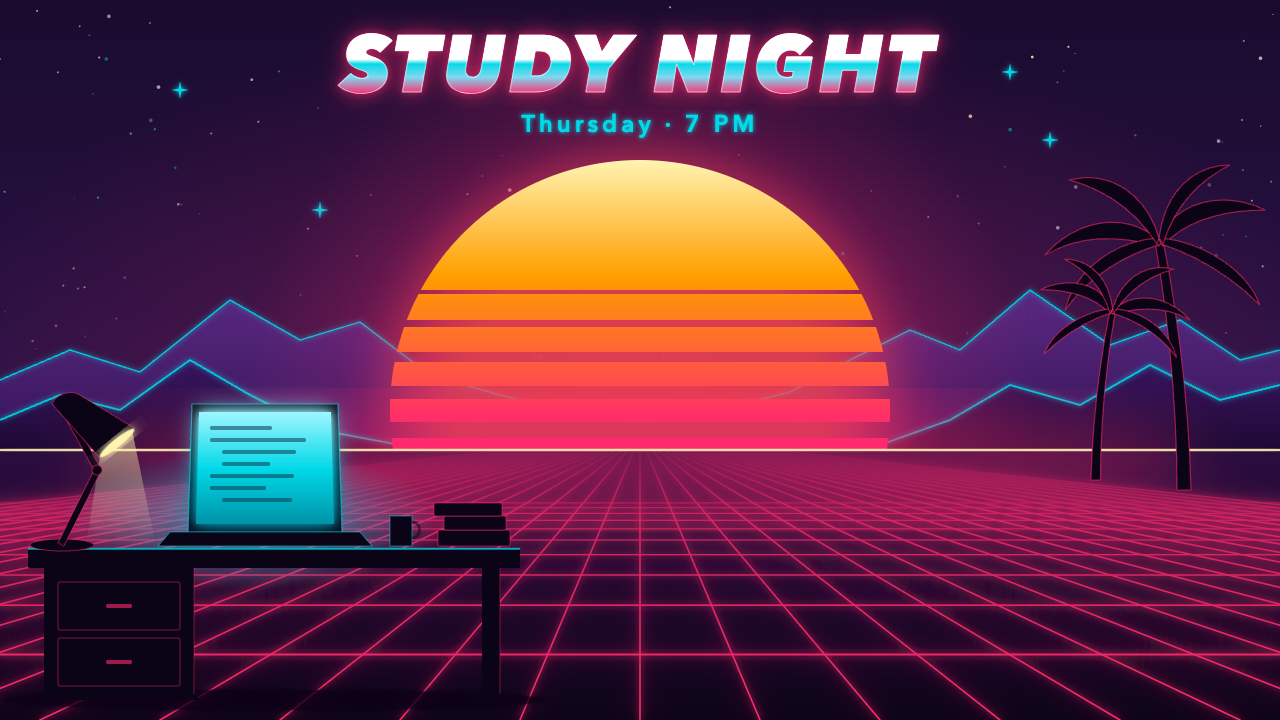
Round 1 · words only
In a new, empty folder, start Claude Code and describe what you see, in your own words. Ask for synth.svg. Don’t give it our picture, and keep it out of the folder.
mkdir t6-picture && cd t6-picture && claude
mkdir t6-picture; cd t6-picture; claude
Score Round 1: the five features (open after Round 1)
Open your synth.svg next to ours. Tick each feature yours matches, once after Round 1 and once after Round 2.
| Feature | Round 1 | Round 2 |
|---|---|---|
| 1 · At the top, “STUDY NIGHT” huge, in heavy italic letters with a chrome gradient (white, cyan, pink) and a pink glow; “Thursday · 7 PM” under it, in cyan. | ||
| 2 · A huge setting sun in the centre, pale yellow at the top fading to hot pink at the bottom, cut by horizontal gaps that widen toward the bottom. | ||
| 3 · A glowing hot-pink grid floor in perspective, and purple mountains with a glowing cyan outline behind it, under a night-purple sky with stars and small cyan sparkles. | ||
| 4 · In the lower left, the dark silhouette of a desk with drawers: a desk lamp, a laptop whose screen glows cyan, a mug and a stack of books. | ||
| 5 · On the right, two palm-tree silhouettes. |
Round 2 · with the picture
Our worked example in class: try it yourself after class, both rounds.
Same folder, same session. Send this, then score again:
Download our picture into this folder: https://monmouthaiteaching.com/learnai/session-materials/week-06-targets/synth.png. Look at it and change my synth.svg to match it as closely as you can. Build everything from shapes and real text; never put the image itself into the picture.
The download doesn’t work? Save the picture above into your folder and tell Claude Code the file name.
How we made it: our 4 prompts (open after Round 2)
Make synth.svg, a 1280 × 720 retro synthwave illustration, the polished kind a design studio would make: layered gradients, soft neon glow, depth from overlapping layers. Colours: night purple #1a0b2e to #3d1a5b for the sky, hot pink #ff2a6d, cyan #05d9e8, sunset orange #ff9e00 and pale yellow #fff3b0. Every word is real text.
In the centre, a huge sun sinking toward the horizon, its gradient running from pale yellow at the top to hot pink at the bottom, cut by five horizontal gaps that widen toward the bottom. Behind it, two layers of purple mountains with cyan rim light. Below the horizon, a glowing hot-pink grid floor in perspective that runs toward the viewer. Stars and a few soft cyan sparkles in the upper sky.
In the foreground on the left, the dark silhouette of a desk with an open laptop whose screen glows cyan, and a desk lamp. Across the top, the title "STUDY NIGHT" in a heavy italic sans-serif with a chrome gradient (white to cyan to pink) and a soft pink glow; under it, "Thursday · 7 PM" in cyan.
Open synth.svg and check it: fix anything that overlaps or runs off the edge, make every word readable, and keep every word as real text, not paths.
What our prompts had that a first try usually doesn’t: Exact colours, what goes where, and a check at the end. We asked for a desk, a laptop and a lamp; Claude Code added the drawers, the mug, the books and the two palm trees on its own. Whatever your words leave out, it fills in with its own choices.
Target 2 · The Study Night poster
Everyone, Thursday 10/15 · your first try
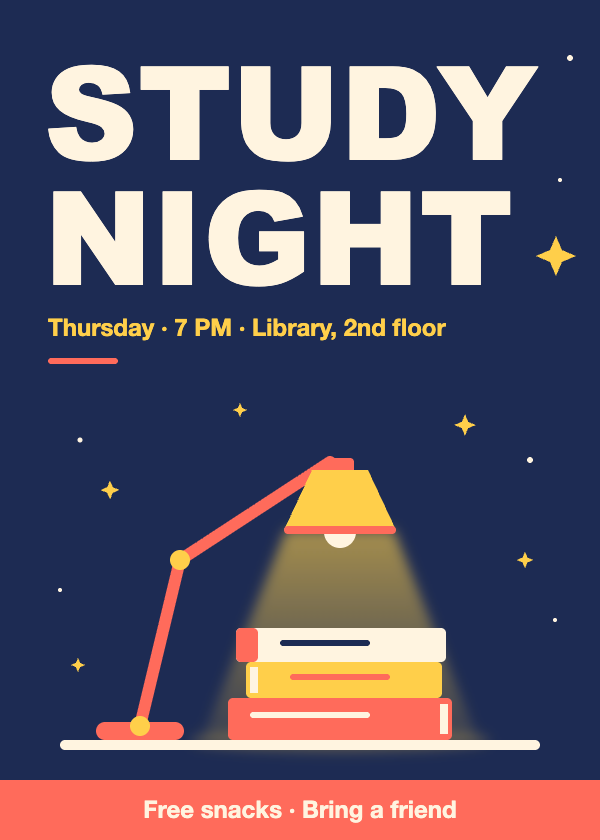
Round 1 · words only
In a new, empty folder, start Claude Code and describe what you see, in your own words. Ask for poster.svg. Don’t give it our picture, and keep it out of the folder.
mkdir t6-poster && cd t6-poster && claude
mkdir t6-poster; cd t6-poster; claude
Score Round 1: the five features (open after Round 1)
Open your poster.svg next to ours. Tick each feature yours matches, once after Round 1 and once after Round 2.
| Feature | Round 1 | Round 2 |
|---|---|---|
| 1 · Navy background, with a coral band across the bottom: “Free snacks · Bring a friend”. | ||
| 2 · “STUDY NIGHT” huge, in off-white, top-left on two lines. | ||
| 3 · The date line in yellow, with a short coral line under it. | ||
| 4 · A coral desk lamp with a yellow shade and a bent arm, lighting three books (coral, yellow, off-white) on a shelf line. | ||
| 5 · Yellow four-point sparkles and small white dots around the lamp. |
Round 2 · with the picture
In class there is time for Round 1 only. Round 2 is for after class, or if you finish early.
Same folder, same session. Send this, then score again:
Download our poster into this folder: https://monmouthaiteaching.com/learnai/session-materials/week-06-targets/poster.png. Look at it and change my poster to match it as closely as you can. Build everything from shapes and real text; never put the image itself into the poster.
The download doesn’t work? Save the picture above into your folder and tell Claude Code the file name.
How we made it: our 4 prompts (open after Round 2)
Make poster.svg, a portrait poster 600 wide and 840 tall, for a study night. Big title "STUDY NIGHT" in a heavy sans-serif, the line "Thursday · 7 PM · Library, 2nd floor", and a flat illustration of a desk lamp shining on a stack of three books. Use only these colours: navy #1d2b53 for the background, yellow #ffcf4a, coral #ff6b5b and off-white #fff4e0.
Put the lamp and the books in the middle of the poster, with the lamp's light as a soft yellow cone falling on the books. The title goes at the top, left-aligned, in off-white; the date line goes under it, in yellow.
Add a coral band across the bottom with "Free snacks · Bring a friend" in off-white, and scatter five small yellow stars in the navy space around the lamp.
Open poster.svg and check it: fix anything that overlaps or runs off the edge, and keep every word as real text, not paths.
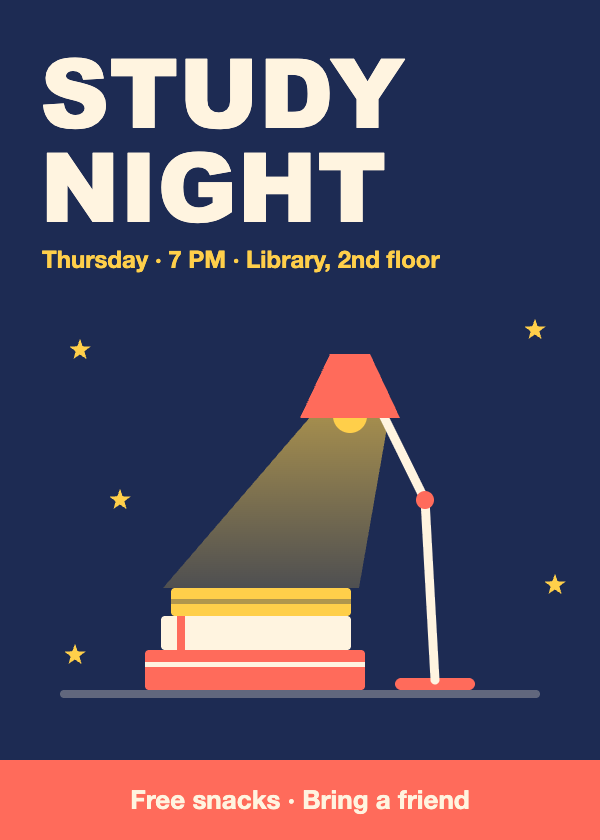
What our prompts had that a first try usually doesn’t: We asked for five small stars and got sparkles and dots: Claude Code decorated on its own. And when we sent the same four prompts all at once, as one message, we got a different poster (below): the same words don’t give the same picture.
Target 3 · The study-cycle deck
Everyone, Thursday 10/15 · second, in two rounds
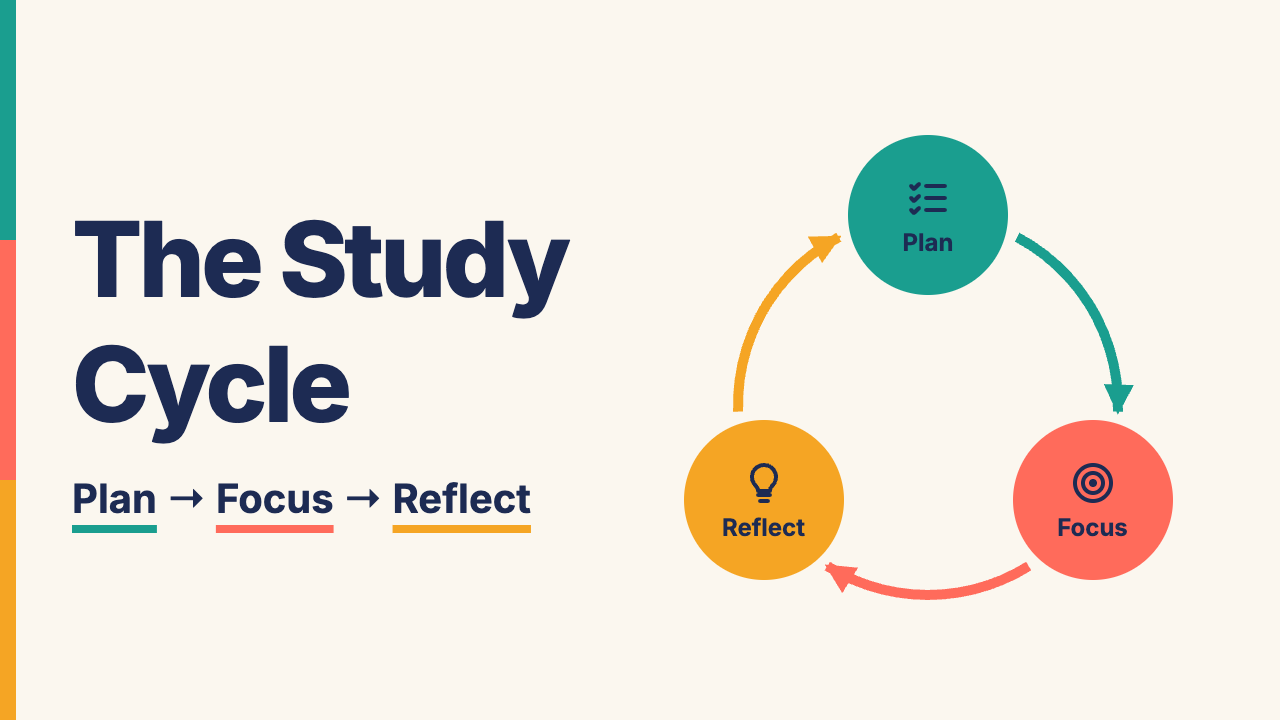
Round 1 · words only
In a new, empty folder, start Claude Code and describe what you see, in your own words. Ask for deck.html. Don’t give it our pictures, and keep them out of the folder.
mkdir t6-deck && cd t6-deck && claude
mkdir t6-deck; cd t6-deck; claude
Score Round 1: the five features (open after Round 1)
Open your deck.html next to ours. Tick each feature yours matches, once after Round 1 and once after Round 2.
| Feature | Round 1 | Round 2 |
|---|---|---|
| 1 · Cream background and navy text; Plan teal, Focus coral, Reflect amber, everywhere. | ||
| 2 · A stripe down the left edge of every slide: teal, then coral, then amber. | ||
| 3 · Slide 1: a big two-line title on the left with “Plan → Focus → Reflect” under it, each word underlined in its colour; on the right, three coloured circles with icons, joined by curved arrows. | ||
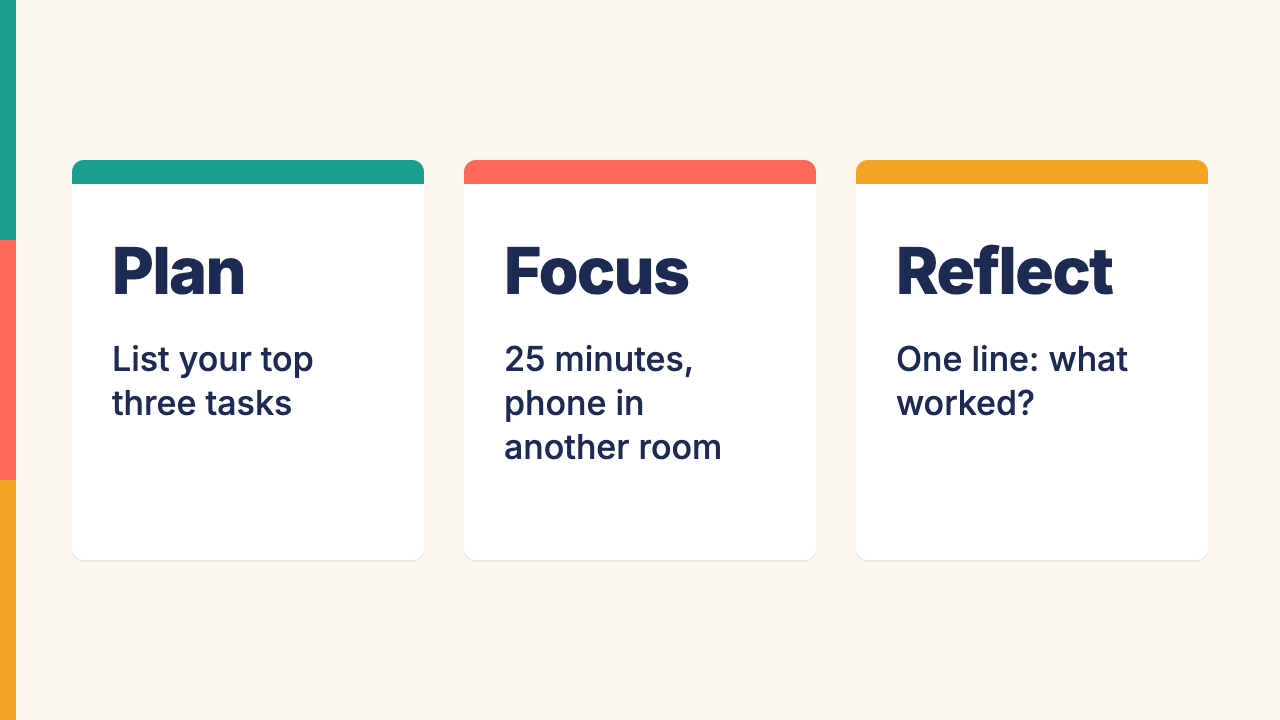
| 4 · Slide 2: three white cards side by side, each with a coloured bar on top, a big stage name and its tip. | ||
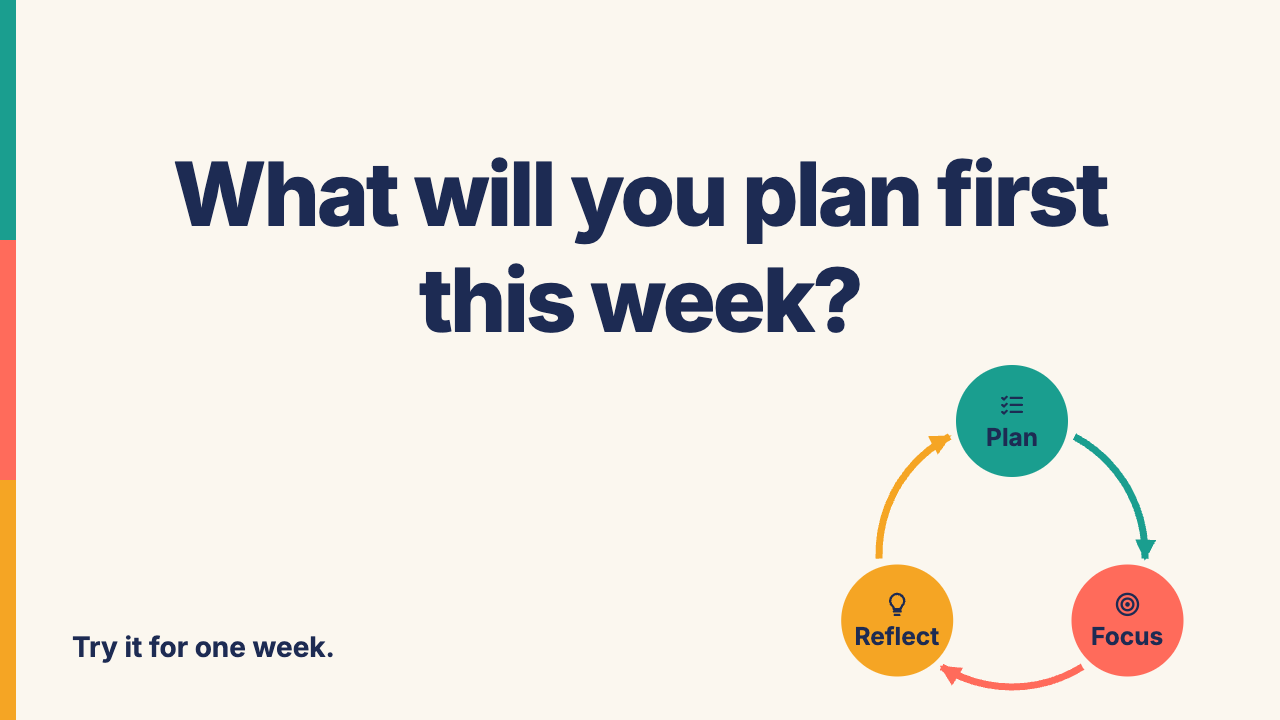
| 5 · Slide 3: the question huge and centred; a small copy of the cycle bottom-right; “Try it for one week.” bottom-left. |
Round 2 · with the pictures
Same folder, same session. Send this, then score again:
Download our three target slides into this folder: https://monmouthaiteaching.com/learnai/session-materials/week-06-targets/target-1.png, https://monmouthaiteaching.com/learnai/session-materials/week-06-targets/target-2.png and https://monmouthaiteaching.com/learnai/session-materials/week-06-targets/target-3.png. Look at them and change my deck.html to match them as closely as you can. Build everything from shapes and real text; never put the images themselves into the deck.
The download doesn’t work? Save the pictures above into your folder and tell Claude Code the file names.
How we made it: our 4 prompts (open after Round 2)
Make deck.html: three slides, each exactly 1280 × 720, one under the other, for first-year students, teaching the study cycle plan → focus → reflect. Use one clean sans-serif font, a cream background #fbf7ef, dark navy text #1d2b53, and one accent colour per stage: plan teal #1a9e8f, focus coral #ff6b5b, reflect amber #f5a524. Every word is real, editable text.
Slide 1: the title "The Study Cycle" big on the left, with the line "Plan → Focus → Reflect" under it; on the right, a circle of three curved arrows linking three round icons labelled Plan, Focus and Reflect, each in its stage colour. Slide 2: three columns, one per stage, each with a thick bar of its colour on top, the stage name, and one tip: Plan, "List your top three tasks"; Focus, "25 minutes, phone in another room"; Reflect, "One line: what worked?"
Slide 3: one big question in the middle, "What will you plan first this week?", with a small copy of the slide 1 cycle in the bottom-right corner and the footer "Try it for one week."
Open deck.html in a browser and check each slide: nothing overlaps or runs off the slide, every word is readable from the back of a classroom, and each stage keeps its colour. Fix whatever fails.
What our prompts had that a first try usually doesn’t: Exact colours, what goes where on each slide, and a check at the end. But when we ran these four prompts again, we got a different deck: no stripe, no coloured underlines, no white cards. It scored 2 of 5 against our own target. Claude Code added those the first time on its own; to get them back, a description has to see them and ask for them.
Target 4 · The study-cycle animation
Thursday 10/15 · third: the animation
Watch ours moving: it opens in a new tab. The pictures below are three moments of it.
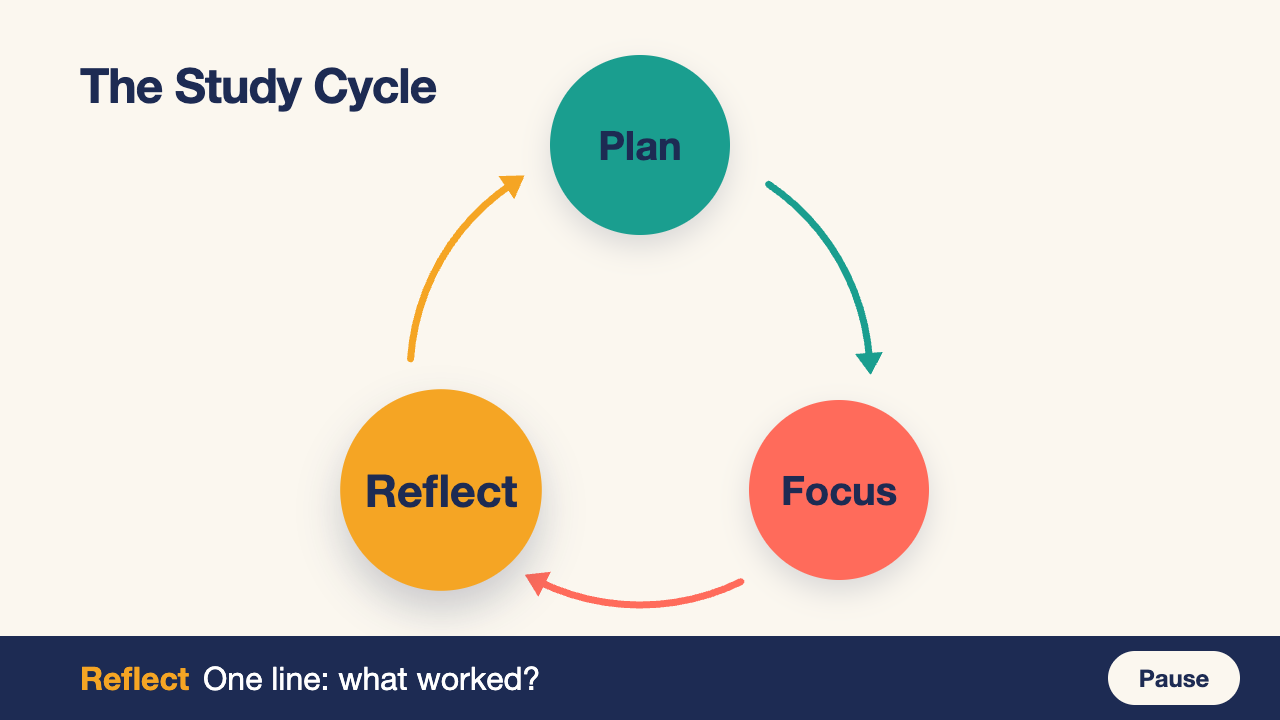
Round 1 · words only
In a new, empty folder, start Claude Code and describe what you see, in your own words. Ask for cycle.html. Don’t give it our file or our pictures, and keep them out of the folder.
mkdir t6-cycle && cd t6-cycle && claude
mkdir t6-cycle; cd t6-cycle; claude
Score Round 1: the five features (open after Round 1)
Open your cycle.html next to ours. Tick each feature yours matches, once after Round 1 and once after Round 2.
| Feature | Round 1 | Round 2 |
|---|---|---|
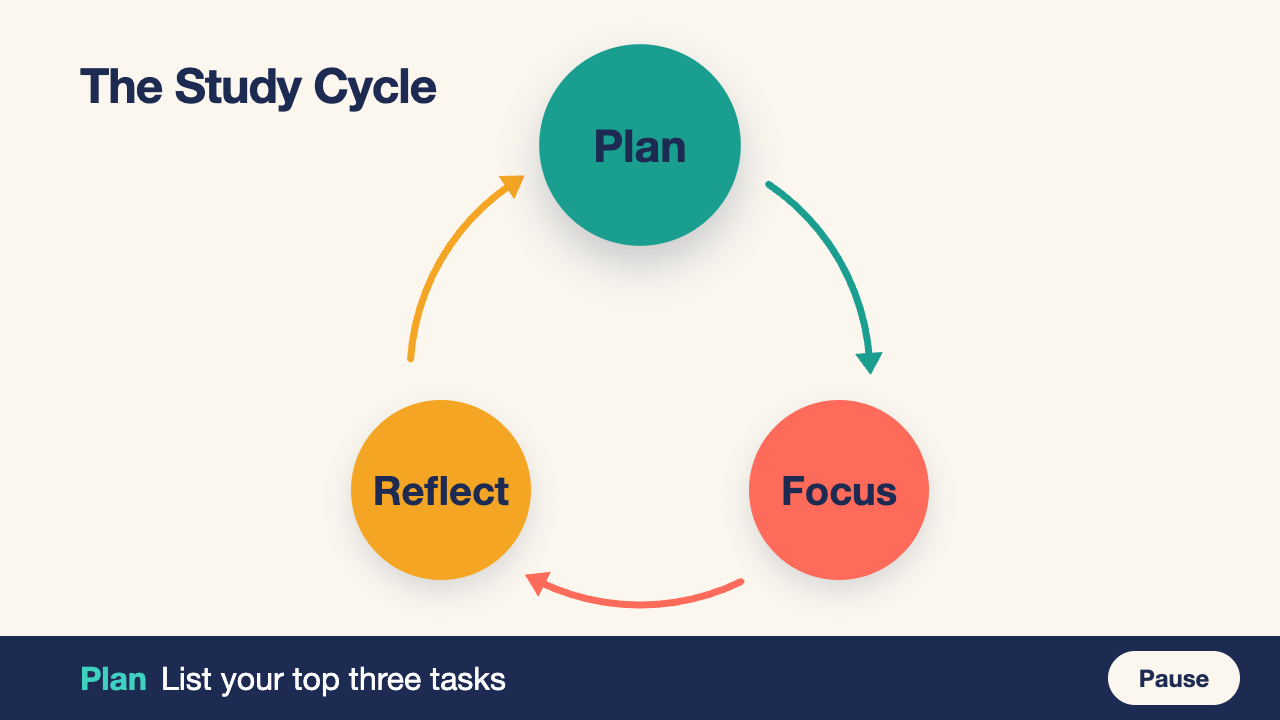
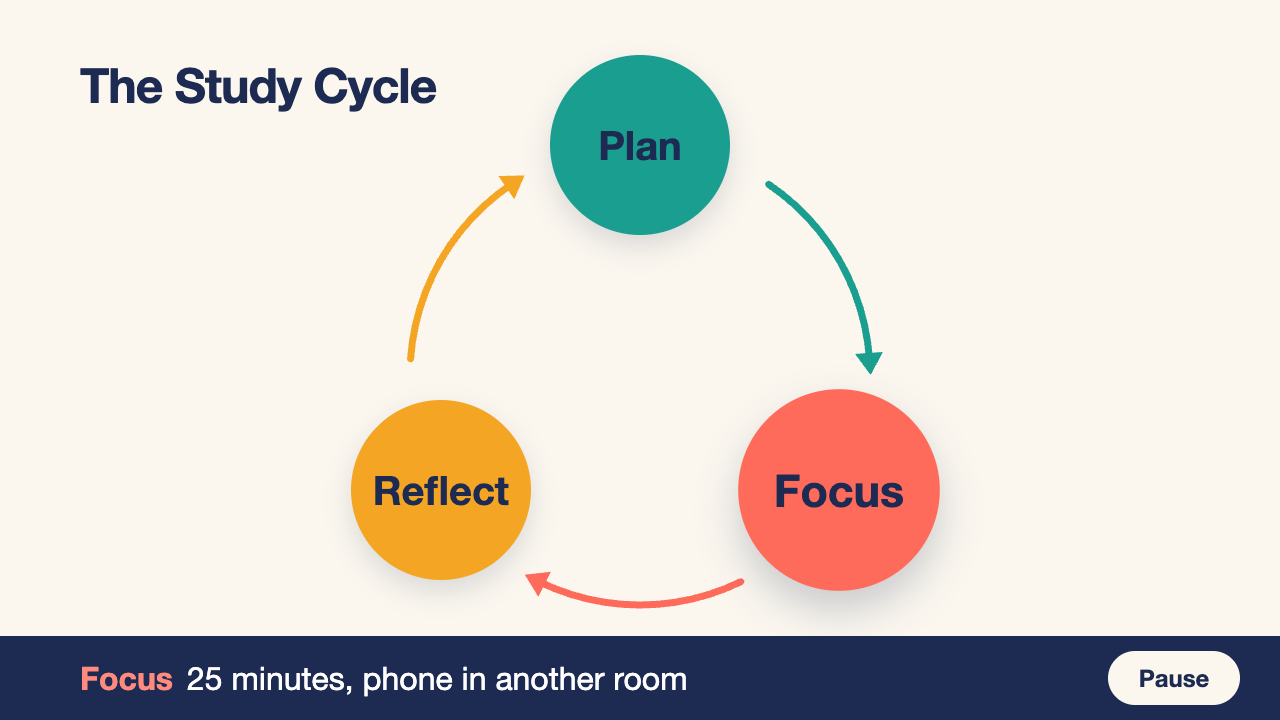
| 1 · “The Study Cycle” top-left, on cream; three circles in a triangle: Plan teal on top, Focus coral bottom-right, Reflect amber bottom-left, their names in navy. | ||
| 2 · An arrow from each circle to the next, clockwise, each in the colour of the circle it leaves. | ||
| 3 · A navy dot travels each arrow in about two seconds, fading out as it reaches each circle and back in as it leaves, round and round. | ||
| 4 · The circle holding the dot grows, and a navy bar across the bottom shows that stage’s name, in its colour, and its tip. | ||
| 5 · A Pause button at the bottom-right of the bar stops the dot and turns into Play. |
Round 2 · with the pictures
In class there is time for Round 1 only. Round 2 is for after class, or if you finish early.
Same folder, same session. Send this, then score again:
Download three moments of our animation into this folder: https://monmouthaiteaching.com/learnai/session-materials/week-06-targets/cycle-1.png, https://monmouthaiteaching.com/learnai/session-materials/week-06-targets/cycle-2.png and https://monmouthaiteaching.com/learnai/session-materials/week-06-targets/cycle-3.png. They show three moments of it. Change my cycle.html to match them as closely as you can, and keep it moving. Never copy our cycle.html itself.
The download doesn’t work? Save the pictures above into your folder and tell Claude Code the file names.
How we made it: our 4 prompts (open after Round 2)
Make cycle.html: one 1280 × 720 stage, centred in the browser window, that animates the study cycle plan → focus → reflect for first-year students. Use a cream background #fbf7ef, dark navy text #1d2b53, one clean sans-serif font, and one colour per stage: plan teal #1a9e8f, focus coral #ff6b5b, reflect amber #f5a524. Plain HTML, CSS and JavaScript in one file; every word is real text.
Put the title "The Study Cycle" at the top-left. Draw three big circles in a triangle, Plan on top, Focus bottom-right, Reflect bottom-left, each filled with its colour with its name in white, joined by three curved arrows going clockwise. A small navy dot travels along the arrows from Plan to Focus to Reflect and back to Plan, two seconds per arrow, forever.
When the dot reaches a circle, that circle grows a little until the dot leaves, and a caption bar along the bottom shows its tip: Plan, "List your top three tasks"; Focus, "25 minutes, phone in another room"; Reflect, "One line: what worked?". Add a Pause button at the bottom-right that stops and restarts the dot. If the browser asks for reduced motion, start paused.
Open cycle.html in a browser and check it: the dot stays on the arrows, the right circle grows and the caption changes at each stop, nothing overlaps, every word is readable from the back of a classroom, and Pause works. Fix whatever fails.
What our prompts had that a first try usually doesn’t: We asked for white names. Claude Code’s own check found white hard to read, so it made the names navy and told us it had gone against our instruction. It also coloured each arrow and added a short stop in every circle: its own choices again.
Next: the graded team lab on Thursday 10/22, where your team makes slides, a video or an animation with Claude Code.