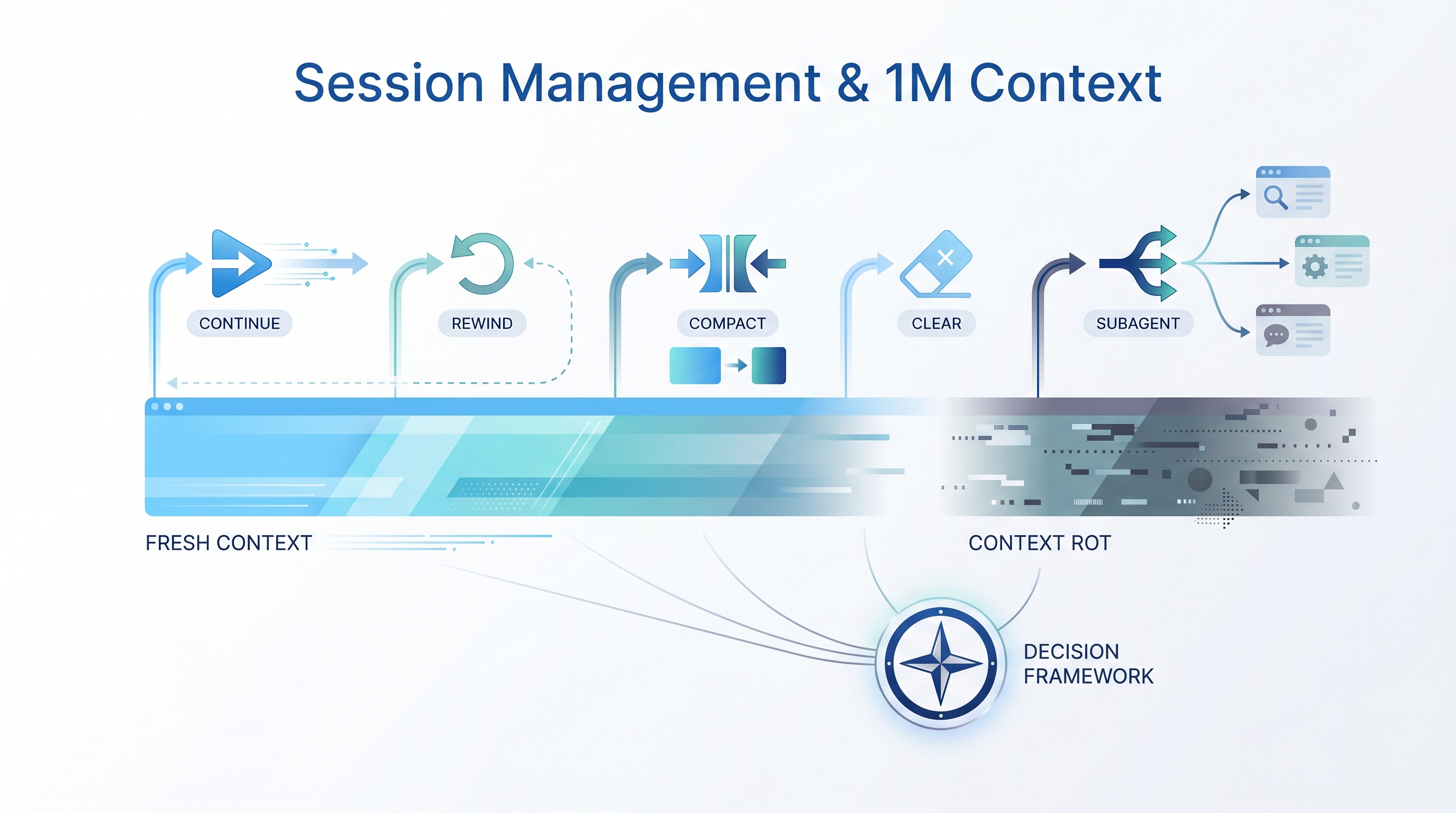
Anthropic published an official guide to session management in Claude Code, written by Thariq Shihipar. The core message: context management shapes your experience with Claude Code more than most users realize. Having 1M tokens doesn’t mean you should use all of them — context rot (attention spreading across stale, irrelevant tokens) degrades quality silently. The most useful part of the post is a decision table that maps every common situation to exactly the right session tool.
Source: Claude Code: Session Management and 1M Context (Anthropic, April 2026)
The Situation Table
This is the centerpiece. Memorize it or pin it next to your terminal.
| Situation | Reach for | Why |
|---|---|---|
| Same task, context is still relevant | Continue | Everything in the window is still load-bearing; don’t pay to rebuild it |
| Claude went down a wrong path | Rewind (double-Esc) | Keep the useful file reads, drop the failed attempt, re-prompt with what you learned |
| Mid-task but session is bloated with stale debugging/exploration | /compact <hint> |
Low effort; Claude decides what mattered. Steer it with instructions if needed |
| Starting a genuinely new task | /clear |
Zero rot; you control exactly what carries forward |
| Next step will generate lots of output you’ll only need the conclusion from | Subagent | Intermediate tool noise stays in the child’s context; only the result comes back |
Decision Flowchart
Task complete. What now?
│
├─ Same task, context still fresh?
│  └─► Continue (don't pay to rebuild context)
│
├─ Claude went the wrong way?
│  └─► Esc Esc (rewind)
│      Keep file reads, drop the bad attempt
│      Re-prompt with what you learned
│
├─ Session feels bloated / slow?
│  └─► /compact <hint>
│      Claude summarizes; you steer with the hint
│
├─ Completely new task?
│  └─► /clear
│      Write a fresh brief, zero context rot
│
└─ Next step = heavy output, only need the conclusion?
   └─► Subagent
       Noise stays in child context
       Only the result comes back
Context Rot — The Invisible Problem
The 1M context window is huge, but bigger isn’t always better. Context rot happens when:
Fresh session:  [system prompt] [your message] [relevant code]
                → High attention density, precise output

Bloated session: [system prompt] [old debug logs] [failed approach #1]
                 [irrelevant file reads] [stale exploration] [your message]
                → Attention spread thin, model "distracted" by noise
The model doesn’t forget old tokens — it actively attends to them. Stale debugging output and abandoned approaches dilute the signal-to-noise ratio. This is why “passing the context limit” isn’t the only problem — degraded quality within the limit is the sneakier failure mode.
The Five Tools in Detail
1. Continue
The default. Keep going in the same session. Use when the context is still load-bearing — every file read, every decision, every piece of state matters for the next step.
When it breaks down: After long debugging sessions, exploratory searches, or multiple failed approaches. The context now contains as much noise as signal.
2. Rewind (Esc Esc)
Double-tap Escape to jump back to a previous message. Claude’s state rolls back, but file reads are preserved — you keep the useful context and drop only the failed attempt.
The key insight: Don’t correct inline (“no, not that, try this”). Rewind to the point where Claude had the right context, then re-prompt with learned constraints:
Before: "Fix the bug" → [bad attempt] → "No, I meant..."
After:  "Fix the bug" → [bad attempt] → Esc Esc →
        "Fix the bug by changing X, don't touch Y"
3. /compact <hint>
Triggers a manual compaction. Claude summarizes the session into a compressed brief, keeping what it thinks matters. The optional <hint> steers the summary:
/compact focus on the auth middleware changes, drop the debugging tangent
Risk: If the model can’t predict where your work is going (common after long debugging sessions), it may drop context you actually needed. Bad autocompact typically happens when “the model can’t predict the direction your work is going.”
Mitigation: Use the hint to tell it what matters.
4. /clear
Nuclear option — wipe the session entirely. You write the brief from scratch. More work, but you control exactly what carries forward.
Best for: Genuine task switches. Write 2-3 sentences of context for the new task. The mental model: pretend you’re briefing a new person.
5. Subagent
Delegate a self-contained task to a child agent. The child gets a clean context, does the work, and returns only the conclusion. All intermediate tool noise (file reads, grep output, build logs) stays in the child’s context.
Mental test: “Will I need this tool output again, or just the conclusion?”
Good subagent tasks:
- Codebase search / exploration
- Verification against a spec
- Documentation generation from git changes
- Running and analyzing test output
When to Start a New Session
The article’s general principle:
“When you start a new task, you should also start a new session.”
Even with 1M tokens, context rot may still occur. The cost of starting fresh is low (a 2-3 sentence brief), but the cost of context rot is invisible until your outputs degrade.
Session length vs. quality:

Quality │ ████████████████████████
        │ ██████████████████████
        │ ████████████████████           ← context rot starts
        │ ████████████████
        │ ██████████████                 ← quality silently degrades
        │ ████████████
        └─────────────────────────────── Context size →
         0        200K       500K      1M tokens
/compact vs. /clear — When to Use Which
| Factor | /compact |
/clear |
|---|---|---|
| Effort | Low — Claude does the work | Higher — you write the brief |
| Control | Model decides what matters | You decide what matters |
| Risk | May drop context you needed | You might forget to include something |
| Best when | Mid-task, need to shed noise | Task switch, need a clean slate |
| Context quality | Good if you hint well | Excellent if you brief well |
| When it fails | After long debugging tangents | When the task is too complex to summarize in 2-3 sentences |
How LearnAI Team Could Use This
- CS305 students using Claude Code for assignments: Teach them the situation table as a decision framework. Most beginners either never start new sessions (context rot) or start fresh too often (wasting context). The table gives them a rubric.
- Research workflows (PCSAT, proof writing): Long proof sessions are exactly where context rot hits hardest. Use
/compact focus on the proof state and pending lemmasto shed the exploratory noise while keeping the mathematical context. - LAI project development: When switching between slide-generator features, Codex review, and wiki writing — use
/clearbetween genuinely different tasks rather than letting one session accumulate cross-domain noise. - Teaching context engineering: This table is a great pedagogical tool for explaining why context management matters — it’s not about running out of space, it’s about attention quality.
Real-World Use Cases
| Scenario | Tool | Example |
|---|---|---|
| Writing a feature, tests pass, moving to next feature | /clear |
Brief: “Auth middleware done. Now add rate limiting to POST /tasks” |
| Debugging a failing test, tried 3 approaches, none worked | Rewind | Double-Esc back to after file reads, re-prompt with constraints from failed attempts |
| Implementing a plan, 45 min in, response quality dropping | /compact |
/compact focus on the remaining plan steps and current file state |
| Need to check if a function exists before using it | Subagent | “Search the codebase for any existing rate limiter middleware” |
| Proof assistant session, 20 lemmas deep, exploring a side branch | /compact |
/compact keep the main proof state and proved lemmas, drop the exploratory branch |
| Switching from coding to writing a wiki entry | /clear |
Completely different task, different tools, different context needs |
The One-Line Summary
Context management shapes your experience more than the model itself. Use the situation table to make the right call every time — Continue, Rewind, Compact, Clear, or Subagent.