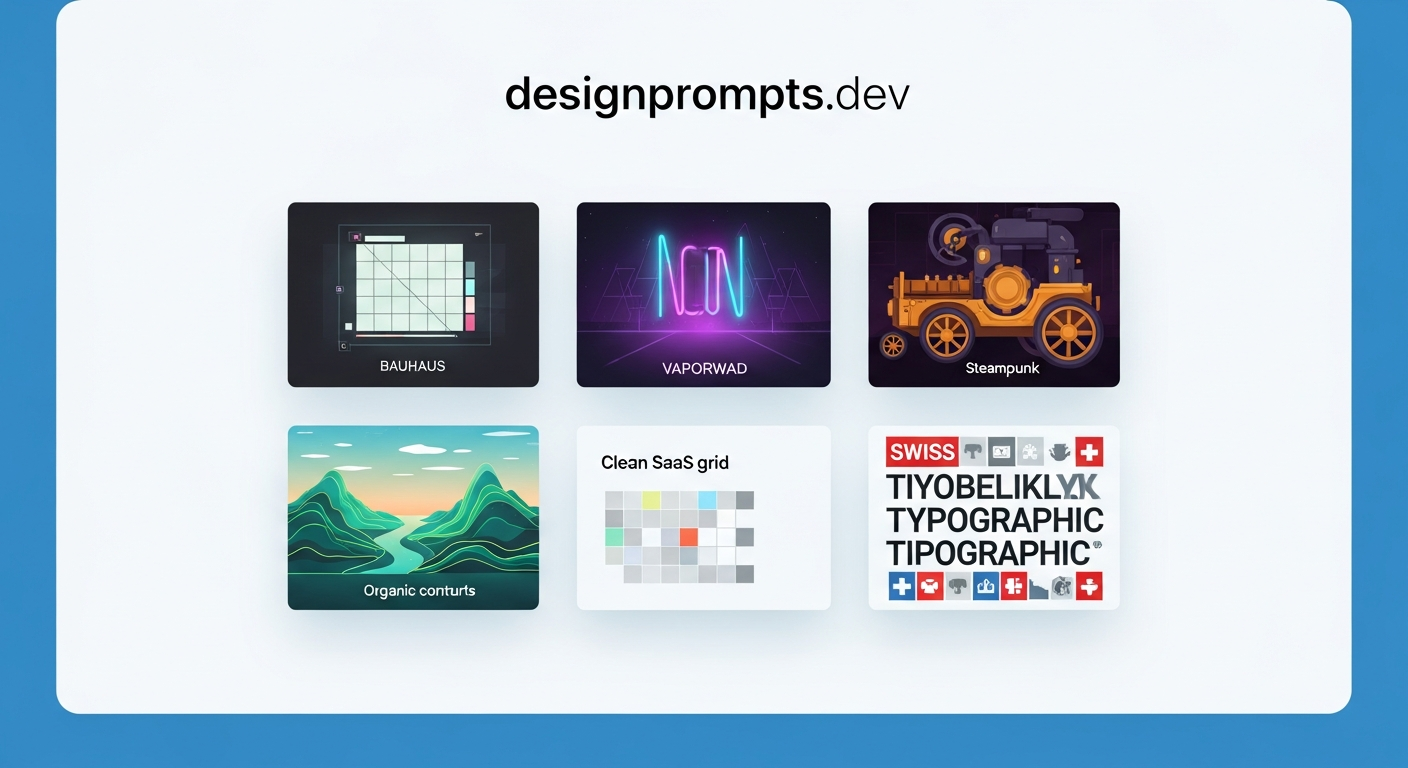
designprompts.dev is a curated prompt library described (in the source post) as the “AI-era frontend design aesthetics encyclopedia” (AI时代的前端设计美学宝典). It collects 30+ distinct design styles — each paired with prompts you can paste directly into AI coding tools or image generators — covering everything from Bauhaus geometric minimalism to Vapor Wave retro-futurism to SaaS dashboard grids. The core promise: skip the prompt engineering and get a production-quality aesthetic instantly.
Note: The “30+” style count and the Chinese-language branding are from a community Weibo post (欧巴颧AI, May 2026), not from the site itself. The actual style count and site copy may differ. Verify at designprompts.dev before citing specific numbers.
| *Source: Weibo post by 欧巴颧AI (May 2026) | Site: designprompts.dev* |
The problem it solves
Designers and frontend engineers reaching for AI tools (Cursor, Claude Code, v0, Midjourney) face a consistent friction: great designs require great prompts, and great prompts require knowing how to describe visual style precisely. Most engineers can identify “I want it to look like Notion” or “I want a dark SaaS feel” but can’t translate that into the specific vocabulary that AI tools respond to.
designprompts.dev encodes that vocabulary. Each style entry is a ready-made system prompt or image prompt that has been tuned to actually produce that aesthetic, not just approximate it.
Style categories covered
The library spans at least 30 styles across several visual traditions:
| Style Family | Example Styles |
|---|---|
| Historical / Fine Art | Bauhaus, Art Deco, Arts & Crafts |
| Retro-Futurist | Vapor Wave, Steampunk, Cyberpunk |
| Naturalist / Organic | Faux Terrain (topographic maps), Wabi-Sabi, Biomorphic |
| Modern SaaS | SaaS Dashboard, Terminal Control Panel, Clean Minimal |
| Editorial | Magazine Layout, Swiss Grid, Brutalist Web |
The site bills itself as covering “mainstream and cutting-edge visual trends” (目前主流和前沿的视觉趋势). Exact style count is listed as “about 30+” and is updated over time.
How it works
- Browse by style — Visual thumbnails let you scan the aesthetic before committing
- Click to copy — Each style has a one-click copy button for its prompt
- Paste into your AI tool — Works with AI coding assistants (Cursor, Claude Code) and image generators (Midjourney, Stable Diffusion, GPT Image 2, Ideogram)
- Adjust parameters — The copied prompt is a starting point; add your specific component or page description after
No account needed, no build step, no API key — pure static reference.
What makes a good style prompt (the site’s implicit model)
Looking at the pattern across entries in this style of library, each effective prompt typically encodes:
[Color palette descriptor]
+ [Typography system]
+ [Layout principles]
+ [Texture / surface treatment]
+ [Motion / interaction feel]
+ [Reference aesthetic anchor]
A Bauhaus prompt encodes: primary color blocks, geometric sans-serif, asymmetric grid, flat surfaces, functional-first, Joost Schmidt poster energy. A Vapor Wave prompt encodes: neon pink/cyan on deep purple, chrome textures, grid floors, early-90s UI elements, lo-fi glitch artifacts.
This encoding work is what designprompts.dev has already done for you.
How LearnAI Team Could Use This
- CS-310 (Advanced OO Programming & Design) UI labs — Students building project UIs often produce generic default-styled interfaces. Pointing them to designprompts.dev gives them a concrete vocabulary for intentional aesthetics without requiring design training.
- Teaching prompt engineering — The site is an excellent case study in “what makes a prompt good.” Compare two styles side-by-side; analyze what specific vocabulary differences produce different outputs. Useful for a prompt-engineering module.
- Research presentation slides — Q produces slides for courses and conferences; a Bauhaus or Swiss Grid prompt gives academic presentations a distinctive, professional feel that stands out from default PowerPoint templates.
- Pairing with UI UX Pro Max skill — Use designprompts.dev to pick a style, use the UI UX Pro Max skill to evaluate the resulting interface against heuristics. A complete design → evaluate → refine loop.
Real-World Use Cases
| Scenario | How to use |
|---|---|
| Rapid prototype styling | Pick a style, copy the prompt, prepend it to a Claude Code or v0 request: “Design a dashboard with this aesthetic: [paste]” |
| Consistent brand identity | Use one style prompt as the system-level aesthetic instruction across all AI-generated components on a project |
| Client presentation variations | Generate the same UI layout in three different styles (SaaS, Bauhaus, editorial) and let the client pick — 10 minutes of work vs. days of design iterations |
| Prompt engineering study | Compare what changes in the prompt between “Steampunk” and “Vapor Wave” — useful for understanding the vocabulary AI models have been trained on |
| Teaching visual literacy | Show students that “good design” is learnable, describable, and replicable through precise language |
Important things to know
- The library is curated, not exhaustive — 30+ styles is a solid coverage of major traditions but won’t cover niche aesthetics (specific regional styles, very recent micro-trends). Use it as a starting map, not an authority.
- Prompt fidelity varies by tool — The same prompt produces different results in Midjourney vs. Claude Code vs. GPT Image 2. The prompts are tuned for AI in general; you may need to adjust syntax for your specific tool.
- This is a reference, not a design system — designprompts.dev gives you the aesthetic vocabulary; it doesn’t generate components, manage tokens, or export design systems. Pair it with your actual toolchain.
- Updated periodically — The site adds new styles as AI design trends evolve. Worth revisiting quarterly.
- Similar resources to compare: Awesome-ChatGPT-Prompts (general), various UI/design-prompt collections on GitHub (search “UI prompt” or “design prompt”), and the visual prompt sections inside Midjourney’s documentation all serve adjacent needs. No single canonical “UI-Prompt-Engineering” repository dominates the space — browse and compare.