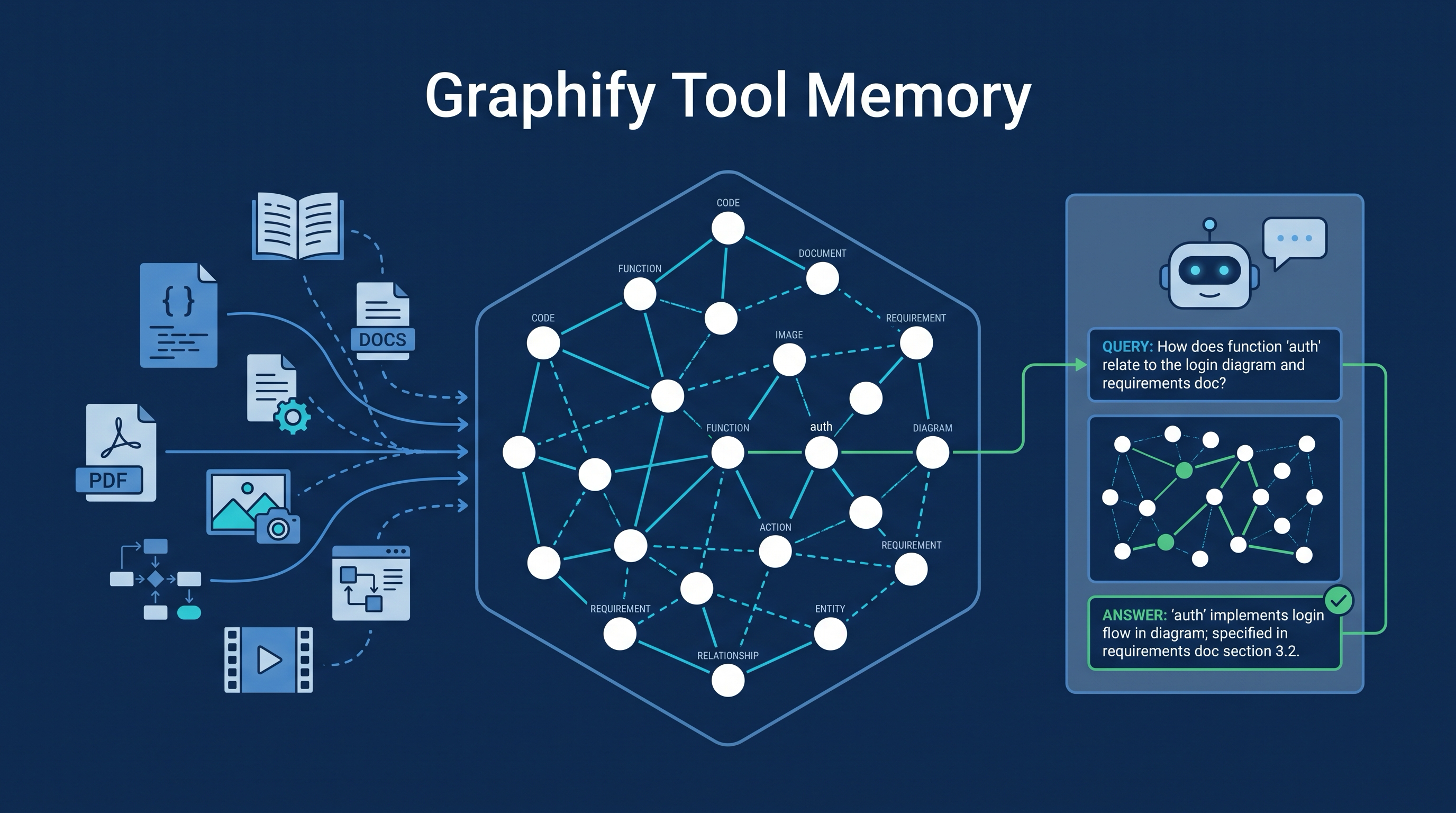
Graphify is an open-source tool for building queryable multimodal knowledge graphs for AI coding assistants. LearnAI’s useful framing is tool memory: not just another code search tool, but a durable map of code, docs, PDFs, images, diagrams, and videos so the agent can ask targeted graph questions instead of repeatedly reading raw files.
| *Source: GitHub: Graphify-Labs/graphify | Graphify documentation site* |
Why This Page Exists
LearnAI already has a strong page on codegraph. This page should not duplicate it. The distinction:
| Page | Main lesson |
|---|---|
codegraph |
A local code-indexing MCP implementation that helps agents answer structural code questions |
Graphify |
A broader pattern: turn mixed project artifacts into a graph-backed memory surface that many agents can query |
Use this entry to teach representation choice. Raw files are a poor interface for repeated agent work. A graph can preserve relationships that are expensive to rediscover every session.
The Pattern
Project material
  code + docs + SQL + PDFs + images + diagrams + video
        |
        v
Graph builder
  AST parsing + semantic extraction + relationship edges
        |
        v
Durable graph output
  concepts, files, communities, paths, explanations
        |
        v
Agent query layer
  "Where is auth handled?"
  "What concepts connect this module to the paper?"
  "Which files explain the dashboard?"
Graphify’s README emphasizes three claims that are useful for students to evaluate:
| Claim | Why it matters |
|---|---|
| Code is parsed locally with tree-sitter | Structural facts can be extracted without asking a model to read every source file |
| Edges distinguish extracted vs inferred relationships | The graph can show whether a connection came directly from source or from resolution/inference |
| It is not a vector index | Graph traversal answers a different class of question than similarity search |
Treat performance numbers from project READMEs as vendor claims until reproduced on your own repo. The stronger lesson does not depend on an exact multiplier: cache the structure once; ask smaller questions later.
How It Differs From Grep, Vector RAG, and CodeGraph
| Approach | Strength | Weakness |
|---|---|---|
| Grep / ripgrep | Exact text, fast, transparent | No memory across sessions; weak on relationships |
| Vector RAG | Good for fuzzy semantic retrieval | Similarity is not structure; may miss call paths or dependencies |
| codegraph | Focused local code structure exposed through MCP | Primarily a codebase structural index |
| Graphify | Multimodal project graph: code, docs, PDFs, images, diagrams, video | Broader surface means more setup, more assumptions, and more claims to verify |
The practical rule: use grep for exact strings, codegraph for local code structure, and Graphify-style graphs when the project knowledge spans multiple artifact types.
Install Shape
The current README shows a fast path like:
uv tool install graphifyy
graphify install
Then inside an assistant session:
/graphify .
Graphify also documents per-agent install commands so assistants are nudged toward the graph before raw search. That is powerful, but it is also a configuration change. Inspect generated files and diffs before using it in a course repo or shared research project.
Student Exercise: Measure Tool Memory
Give students one medium-size repository and run three passes:
| Pass | What students do | What to measure |
|---|---|---|
| Raw discovery | Ask an agent to explain one feature with only file tools | Tool calls, tokens, wrong assumptions |
| Indexed code | Repeat with codegraph available | Whether structural questions improve |
| Multimodal graph | Add docs/PDF/design notes through Graphify | Whether the agent connects code to intent better |
The grade should not be “which tool wins.” The grade should be whether students can explain what each representation made easier or harder.
How LearnAI Team Could Use This
- Codebase onboarding — use Graphify-style graphs when a project includes README docs, diagrams, papers, screenshots, and code.
- Program-analysis teaching — compare AST/call graph extraction with LLM-assisted semantic edges.
- Research reproduction — map a paper plus its implementation so students can ask “where does the claimed method live in code?”
- Agent workflow design — teach that memory is not just chat history; it can be a structured external artifact.
Real-World Use Cases
| Scenario | Why Graphify-style memory helps |
|---|---|
| Paper + code reproduction | Connect algorithm names in the paper to implementation files |
| Design-doc heavy repo | Link architecture diagrams, prose decisions, and source modules |
| Long-lived course project | Let each student team query the same project graph instead of rediscovering structure |
| Multimodal product docs | Include screenshots, diagrams, and PDFs that a code-only index would miss |
| Agent handoff | Give the next agent a durable graph instead of a compressed chat transcript |
Important Things To Know
- Do not confuse a graph with proof. The graph can point to evidence; it does not guarantee the answer is correct.
- Inspect install behavior. Tools that add hooks or agent instructions can change future agent behavior.
- Separate local parsing from semantic extraction. Code AST extraction and document/image/video semantic passes may have different privacy properties.
- Prefer primary source docs over social metrics. Stars and viral screenshots are discovery signals, not quality guarantees.
- Keep codegraph in the toolkit. Graphify does not replace a focused structural code index; it broadens the memory surface.