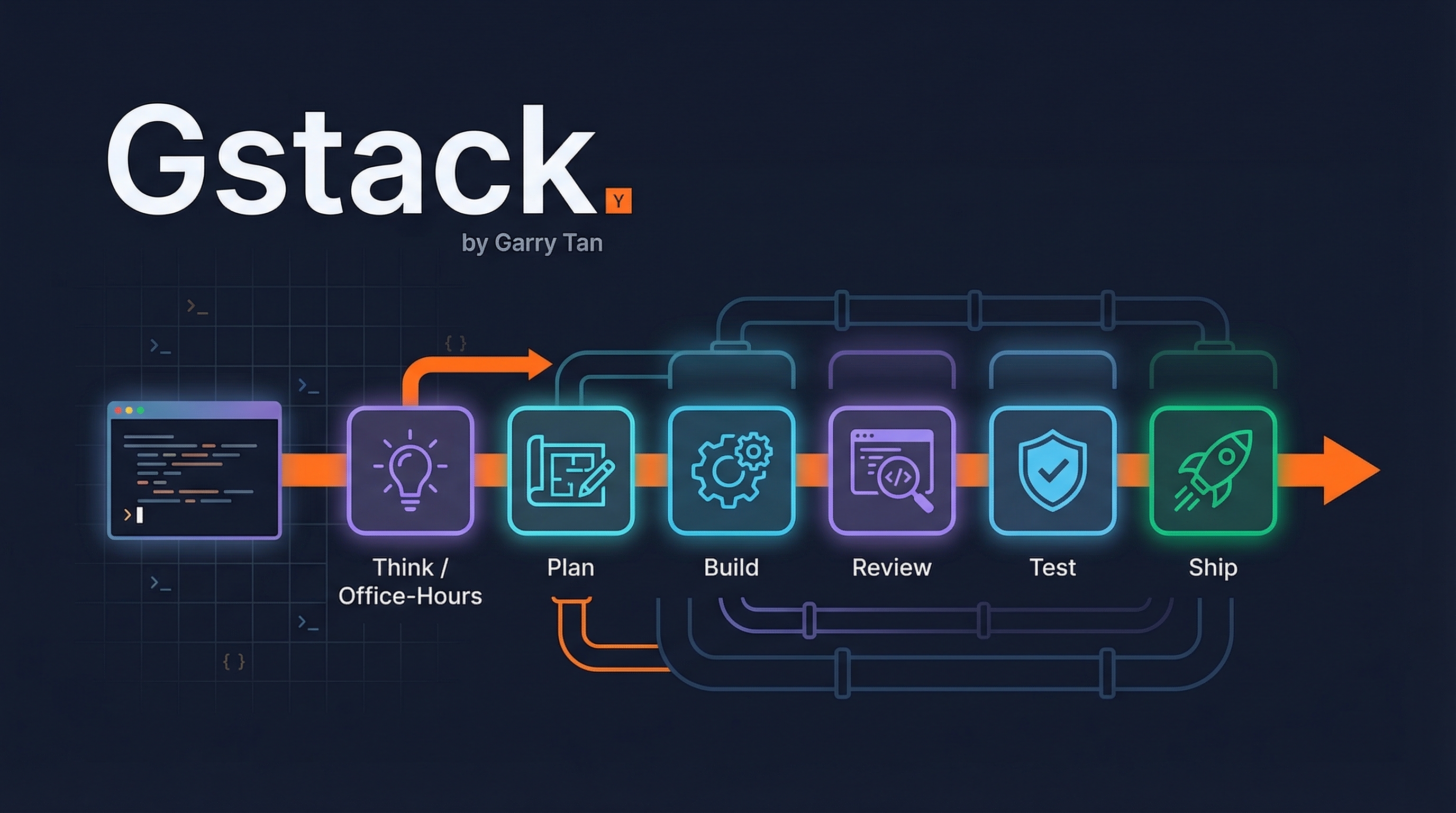
Gstack is Y Combinator CEO Garry Tan’s open-source Claude Code setup that turns a single AI assistant into a virtual engineering team. It provides 18 specialist roles and 7 power tools — all as slash commands — organized as a sprint process: Think, Plan, Build, Review, Test, Ship, Reflect. Garry uses it to ship 10,000-20,000 lines of production code per day while running YC full-time.
| *Source: GitHub - garrytan/gstack | TechCrunch Coverage | SitePoint Tutorial | MarkTechPost* |
Why This Matters
Most people use Claude Code as a copilot — type a request, get code back. Gstack reframes it as a managed team. Instead of one generic agent, you get specialized roles that challenge your thinking, review each other’s work, and follow a structured process. The key insight: without process, 10 parallel agents is 10 sources of chaos. With process — think, plan, build, review, test, ship — each agent knows exactly what to do and when to stop.
The numbers back it up: Garry wrote 600,000+ lines of production code (35% tests) in 60 days, averaging 140,000 lines added per week across 362 commits.
The Sprint Process
Gstack skills are ordered like a real engineering sprint. Each skill feeds into the next:
/office-hours          ─── Think: reframe the problem
       ↓
/plan-ceo-review       ─── Plan: challenge scope, find 10-star product
/plan-eng-review       ─── Plan: architecture, data flow, edge cases
/plan-design-review    ─── Plan: rate design 0-10, detect AI slop
       ↓
  [Build in plan mode]  ─── Build: implement the approved plan
       ↓
/review                ─── Review: find bugs that pass CI
/design-review         ─── Review: visual audit + atomic fixes
       ↓
/qa                    ─── Test: real browser, real clicks, real bugs
       ↓
/ship                  ─── Ship: sync, test, audit coverage, open PR
/land-and-deploy       ─── Ship: merge, wait for CI, verify production
       ↓
/retro                 ─── Reflect: weekly stats, shipping streaks
Quick Start — First 10 Minutes
# Install (30 seconds)
git clone https://github.com/garrytan/gstack.git ~/.claude/skills/gstack
cd ~/.claude/skills/gstack && ./setup

# Then in Claude Code:
/office-hours          # Describe what you're building
/plan-ceo-review       # Review the feature idea
/review                # Review any branch with changes
/qa https://staging.example.com  # Test your app
/ship                  # Push and open PR
All 25 Skills
Specialists (18)
| Skill | Role | What They Do |
|---|---|---|
/office-hours |
YC Office Hours | 6 forcing questions that reframe your product before code |
/plan-ceo-review |
CEO/Founder | Rethink the problem — 4 modes: Expansion, Selective, Hold, Reduction |
/plan-eng-review |
Eng Manager | ASCII diagrams, data flow, test matrix, failure modes |
/plan-design-review |
Senior Designer | Rates each dimension 0-10, AI slop detection |
/design-consultation |
Design Partner | Full design system from scratch with mockups |
/review |
Staff Engineer | Find bugs that pass CI but blow up in production |
/investigate |
Debugger | Systematic root-cause debugging, stops after 3 failed fixes |
/design-review |
Designer Who Codes | Audit + fix with atomic commits and screenshots |
/qa |
QA Lead | Real browser testing — find, fix, verify, write regression tests |
/qa-only |
QA Reporter | Same as /qa but report-only, no code changes |
/ship |
Release Engineer | Sync main, run tests, audit coverage, push, open PR |
/land-and-deploy |
Release Engineer | Merge PR, wait for CI/deploy, verify production |
/canary |
SRE | Post-deploy monitoring — console errors, perf regressions |
/benchmark |
Perf Engineer | Page load, Core Web Vitals, bundle size comparisons |
/document-release |
Tech Writer | Update all docs to match what shipped |
/retro |
Eng Manager | Team-aware weekly retro with per-person breakdowns |
/browse |
QA Engineer | Headless Chromium browser — ~100ms per command |
/setup-browser-cookies |
Session Manager | Import cookies from Chrome/Arc/Brave/Edge |
Power Tools (7)
| Skill | What It Does |
|---|---|
/codex |
Second opinion from OpenAI Codex — review, adversarial, or consultation mode |
/careful |
Warns before destructive commands (rm -rf, DROP TABLE, force-push) |
/freeze |
Lock file edits to one directory while debugging |
/guard |
/careful + /freeze combined — maximum safety for prod work |
/unfreeze |
Remove the freeze boundary |
/setup-deploy |
One-time deploy configuration (Fly.io, Render, Vercel, etc.) |
/gstack-upgrade |
Self-updater — upgrade gstack to latest |
Key Workflow Patterns
/office-hours — The Reframe
You say “I want to build a daily briefing app.” The agent pushes back: “What you actually described is a personal chief of staff AI.” It extracts capabilities you didn’t realize you were describing, challenges your premises, generates 3 implementation approaches, and recommends the narrowest wedge to ship tomorrow. The design doc feeds into every downstream skill.
/qa — The Eyes
The agent opens a real browser, navigates your app, clicks through flows, and finds bugs. When it finds one, it fixes it with an atomic commit, generates a regression test, and re-verifies. This was the unlock that let Garry go from 6 to 12 parallel workers.
Parallel Sprints
One sprint takes ~30 minutes. But you can run 10-15 in parallel using Conductor — different features, different branches, different agents. You manage them like a CEO manages a team: check in on decisions that matter, let the rest run.
Why Students Should Care
Gstack isn’t just for YC founders — it’s arguably even more valuable for students learning to build software. Here’s why:
Learn Professional Engineering Practices by Doing
Most CS programs teach you to write code but not how to ship it. Gstack forces you through the same workflow used at top startups: plan → review → test → ship → reflect. Every /review teaches you what production bugs look like. Every /plan-eng-review teaches you to think about architecture before coding. You absorb professional habits without needing a senior engineer sitting next to you.
/office-hours Teaches Product Thinking
Students often jump straight to code. /office-hours stops you and asks: What problem are you actually solving? Who is this for? What’s the narrowest thing you can ship? This is the YC way of thinking — the same framework that shaped Coinbase and Instacart. For hackathons, capstone projects, or side projects, this reframing is the difference between building something cool and building something that matters.
/review and /qa Replace the Mentor You Don’t Have
A staff engineer reviewing your code is something most students never get until their first job. /review catches bugs that pass CI but break in production, explains why they’re bugs, and auto-fixes the obvious ones. /qa opens a real browser and tests your app like a user would. These are the learning loops that accelerate growth — immediate, specific feedback on real code.
Build a Portfolio That Stands Out
With gstack’s sprint process, a student can ship production-quality features with tests, documentation, and clean PRs — the kind of work that impresses in interviews. /ship enforces test coverage. /document-release keeps your README current. Your GitHub profile looks like a professional developer’s, not a student’s.
Safe Environment to Learn Dangerous Operations
/careful warns before destructive commands. /freeze prevents accidental changes outside your scope. /guard combines both. Students can experiment with git, databases, and deployments without the terror of accidentally deleting everything — the guardrails teach you what’s dangerous while protecting you from the consequences.
Concrete Student Scenarios
| Scenario | Skills to Use | What You Learn |
|---|---|---|
| Hackathon weekend | /office-hours → build → /ship |
Product thinking + rapid shipping |
| Capstone project | Full sprint pipeline | Professional engineering workflow |
| Learning a new framework | /investigate + /qa |
Systematic debugging + testing |
| First open source contribution | /review + /ship |
Code review standards + PR etiquette |
| Interview prep portfolio | /plan-eng-review + /ship + /document-release |
Architecture thinking + documentation |
How LearnAI Team Could Use This
- Teach professional AI-assisted software workflows — use the sprint sequence to show students how planning, review, QA, shipping, and retrospectives fit together.
- Create role-based coding labs — assign students to compare
/plan-eng-review,/review,/qa, and/shipoutputs on the same project. - Model agent orchestration — demonstrate how specialist skills reduce vague prompting and make AI coding work more inspectable.
- Portfolio coaching — help learners turn side projects into reviewed, tested, documented PR-based work.
Real-World Use Cases
- Startup feature development — structure fast product iteration from idea review through PR and deployment.
- Code review and QA — catch production bugs, browser issues, and missing regression tests before shipping.
- Hackathons and capstones — give small teams a repeatable process for scoping, building, testing, and documenting work.
- Engineering enablement — standardize AI coding practices across teams using shared slash commands and safety guardrails.
How It Compares to Generic Claude Code
| Aspect | Generic Claude Code | With Gstack |
|---|---|---|
| Planning | Ad-hoc prompts | Structured /office-hours → /plan-* pipeline |
| Code Review | Manual or basic | Staff engineer + optional cross-model (Codex) review |
| QA | None built-in | Real browser testing with regression test generation |
| Shipping | Manual git/PR | One-command /ship → /land-and-deploy pipeline |
| Safety | Basic | /careful + /freeze + /guard guardrails |
| Documentation | Manual | Auto-updated on every /ship |
Platform Support
Works on Claude Code (native), Codex, Gemini CLI, and Cursor. Uses the SKILL.md standard — skills are just Markdown files discovered automatically.
Requirements
Claude Code, Git, Bun v1.0+, Node.js (Windows only)