AI can compress a semester into a weekend — but only if you stay in the driver’s seat. The students who learn fastest with AI aren’t the ones who delegate the most. They’re the ones who think harder, ask better questions, and use AI to amplify effort they’re already putting in.
| *Sources: MIT Student NotebookLM Workflow (@ihtesham2005) | NotebookLM + Zotero Weekend Study Plan (XDA) | OECD Digital Education Outlook 2026 | Stanford: Critical Thinking in the Age of AI* |
The Trap: AI Makes Learning Look Easy
Without AI:                          With AI (wrong way):

  Read → Struggle → Understand       Prompt → Copy → "Done"
       → Try → Fail → Retry                → No struggle
       → Debug → Finally get it             → No understanding
       → REAL LEARNING                      → NO LEARNING
AI gives polished, confident answers instantly. That feels productive — but the struggle IS the learning. When you skip the struggle, you skip the skill formation.
Research backs this up: students who delegate coding to AI score 17% lower on evaluations than those who wrestle with problems themselves (Anthropic skill-formation study). The biggest gap? Debugging — because the control group was forced to resolve errors independently.
The Right Way: AI as Learning Amplifier
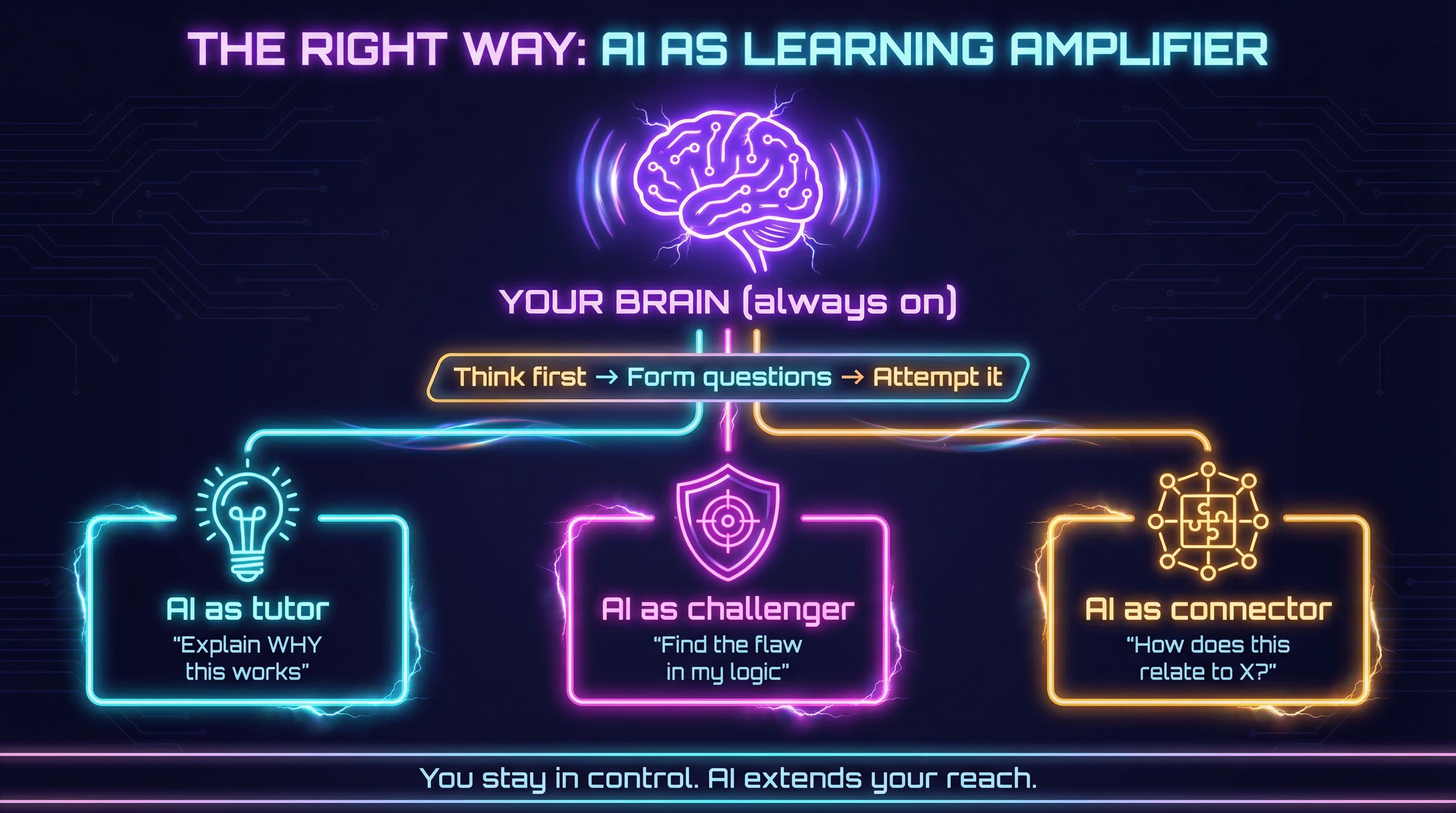
The key mindset shift: AI is your study partner, not your substitute.
The 48-Hour Semester: How It Actually Works
A CS student at MIT compressed a full semester into a focused study sprint and finished with a 4.0 GPA. The workflow — found in a deleted Reddit thread — wasn’t about asking AI for answers. It was about using AI to study smarter:
Step 1: Attack Patterns, Not Content
Instead of “summarize this chapter,” the student prompted:
“Give me the 3 ways professors trick students on this concept. Then generate a problem that combines it with everything from the last 3 weeks.”
This forces active recall and pattern recognition — you’re not reading, you’re training your brain to spot traps.
Step 2: Find Your Blind Spots
The student uploaded every wrong answer from the entire semester and asked:
“Find the pattern in my mistakes. What’s the one concept I keep misunderstanding in different forms?”
AI is uniquely good at spotting patterns across large datasets — including your own error history. This turns mistakes into a personalized study guide.
Step 3: Build Connections, Not Flashcards
Using tools like NotebookLM + Zotero, the student organized materials into interconnected notebooks and asked questions across sources — not within them. The goal: understand relationships between concepts, not memorize isolated facts.
High-Learning vs Low-Learning AI Patterns
From the AI Fluency Index, we know that how you interact with AI determines whether you learn or just “offload”:
| Pattern | What it looks like | Learning outcome |
|---|---|---|
| Conceptual Inquiry | Ask high-level “why” questions, write code yourself | High (65-86%) |
| Generation-Then-Comprehension | Generate code first, then use AI to understand it deeply | High |
| Hybrid Code-Explanation | Demand both code AND detailed explanation of principles | High |
| AI Delegation | Ask AI to write everything, paste blindly | Low (24-39%) |
| Progressive AI Reliance | Start independently, give up when it gets hard | Low |
| Iterative AI Debugging | Use AI as “fix machine” without understanding errors | Low |
The pattern is clear: high learners stay cognitively engaged. They use AI to deepen understanding, not replace it.
5 Rules for Learning With AI
1. Think Before You Prompt
Form your own answer — even a rough one — before asking AI. This activates your brain and gives you something to compare against.
2. Ask “Why,” Not “What”
Don’t ask: “What is the answer to X?” Ask: “Why does X work this way? What would break if I changed Y?”
3. Embrace the Hard Parts
When something is challenging, that’s the signal to lean in, not delegate. The difficulty is where skill forms. Use AI to learn the hard thing in your own style — not to skip it.
4. Make AI Challenge You
Prompt AI to find flaws in your reasoning, generate harder problems, or explain where your mental model breaks down. Use it as a sparring partner.
5. Iterate, Don’t Accept
85.7% of effective AI conversations involve iteration. Never accept the first response as final. Push back, ask follow-ups, and verify against your own understanding.
How LearnAI Team Could Use This
This wiki exists because learning in the AI era requires a new kind of literacy. It’s not about mastering prompts — it’s about mastering how you think with AI:
- Learn challenging things — but in your own style, with AI as a guide
- Don’t stop thinking just because AI can think for you
- Use AI to compress time, not compress understanding
- The goal isn’t efficiency — it’s durable knowledge
The students and professionals who thrive won’t be the ones who use AI the most. They’ll be the ones who use it the most intentionally.
Real-World Use Cases
- Students can use AI to diagnose weak concepts from past mistakes before exams.
- Instructors can design AI-supported assignments that reward explanation, iteration, and independent reasoning.
- Professional learners can compress study time while preserving durable understanding through active recall and verification.