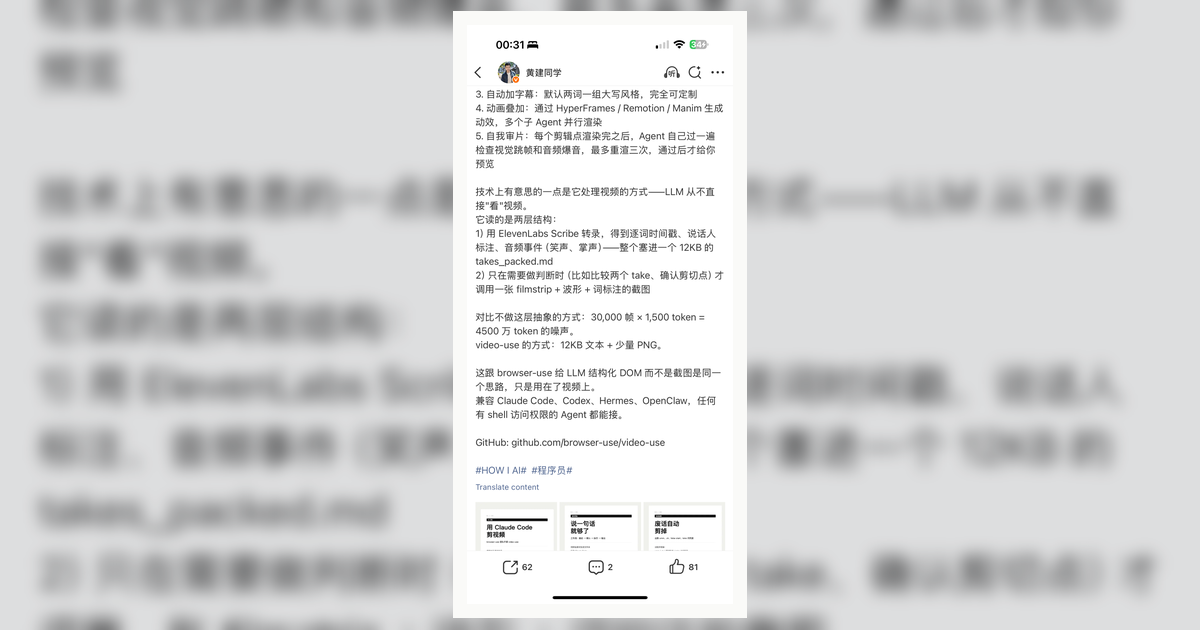
video-use is an open-source workflow for editing videos with coding agents. The interesting engineering idea is not “Claude can edit video”; it is representation choice. The agent does not reason over thousands of raw frames. It reads a compact transcript with word-level timing, then asks for visual composites only when it needs to make a cut decision.
| *Source: GitHub — browser-use/video-use | Browser Use Cloud | July source screenshots: IMG_2357.PNG, IMG_2380.PNG* |
Why this matters
Naive multimodal workflows can waste context by feeding an agent too much raw media. video-use uses a better surface:
Raw takes
   |
   v
Transcribe audio with timestamps
   |
   v
Pack transcript into takes_packed.md
   |
   v
Agent reasons over words, speakers, pauses, and events
   |
   v
Call timeline_view only for ambiguous visual decisions
   |
   v
Render final.mp4 and self-check cut boundaries
This is the same general principle as browser-use exposing a DOM instead of only screenshots: give the model the structure it can reason over.
What it does
The README lists a practical video-editing pipeline:
| Capability | Why it matters |
|---|---|
| Filler-word and dead-space cuts | Handles the common cleanup pass |
| Word-level timestamps | Cuts can land on speech boundaries |
| Speaker diarization and audio events | Useful for interviews and multi-speaker footage |
| Subtitles | Makes short-form clips faster to produce |
| Animation overlays | Can call HyperFrames, Remotion, Manim, or PIL |
| Self-eval loop | Checks rendered output at cut boundaries before preview |
| Project memory | Keeps project.md so future sessions know prior choices |
The representation lesson
For students, the central idea is:
Bad agent interface:
  "Here are 30,000 frames. Understand the video."

Better agent interface:
  "Here is a transcript, exact timestamps, speaker labels,
   silence gaps, and a tool for visual checks when needed."
The agent becomes better because the interface is better, not because the model magically “watched” the video like a human editor.
Setup shape
The README’s documented setup path expects shell access, ffmpeg, Python dependencies, and an ElevenLabs API key for transcription. It can be used from Claude Code, Codex, Hermes, OpenClaw, or another agent with shell access.
Manual install follows this shape:
git clone https://github.com/browser-use/video-use ~/Developer/video-use
ln -sfn ~/Developer/video-use ~/.claude/skills/video-use
# ln -sfn ~/Developer/video-use ~/.codex/skills/video-use

cd ~/Developer/video-use
uv sync
brew install ffmpeg
For real projects, test on non-sensitive footage first. Video can contain faces, voices, locations, and private conversations.
How LearnAI Team Could Use This
- Teaching-video pipeline — combine transcript-first editing with Manim + Remotion explainers.
- Representation-design lesson — compare raw frames, transcripts, DOMs, ASTs, and knowledge graphs as agent input surfaces.
- Student media assignment — ask students to make a 60-second explainer and submit both the final video and the edit plan.
- Human-in-the-loop demo — show how strategy approval before editing changes trust.
Important things to know
- This is an editing workflow, not a replacement for editorial judgment.
- The transcript-first design works best for speech-heavy content. Purely visual footage still needs more visual inspection.
ffmpegand the documented transcription setup are real dependencies; budget time for first-run setup.- The self-eval loop checks technical cut quality, not whether the story is compelling.
Real-World Use Cases
| Scenario | Use |
|---|---|
| Lecture clips | Cut a long recording into short concept videos |
| Research demos | Produce a clean project walkthrough from rough screen recordings |
| Interviews | Remove filler words, false starts, and long pauses |
| Short-form explainers | Add subtitles and lightweight motion overlays |