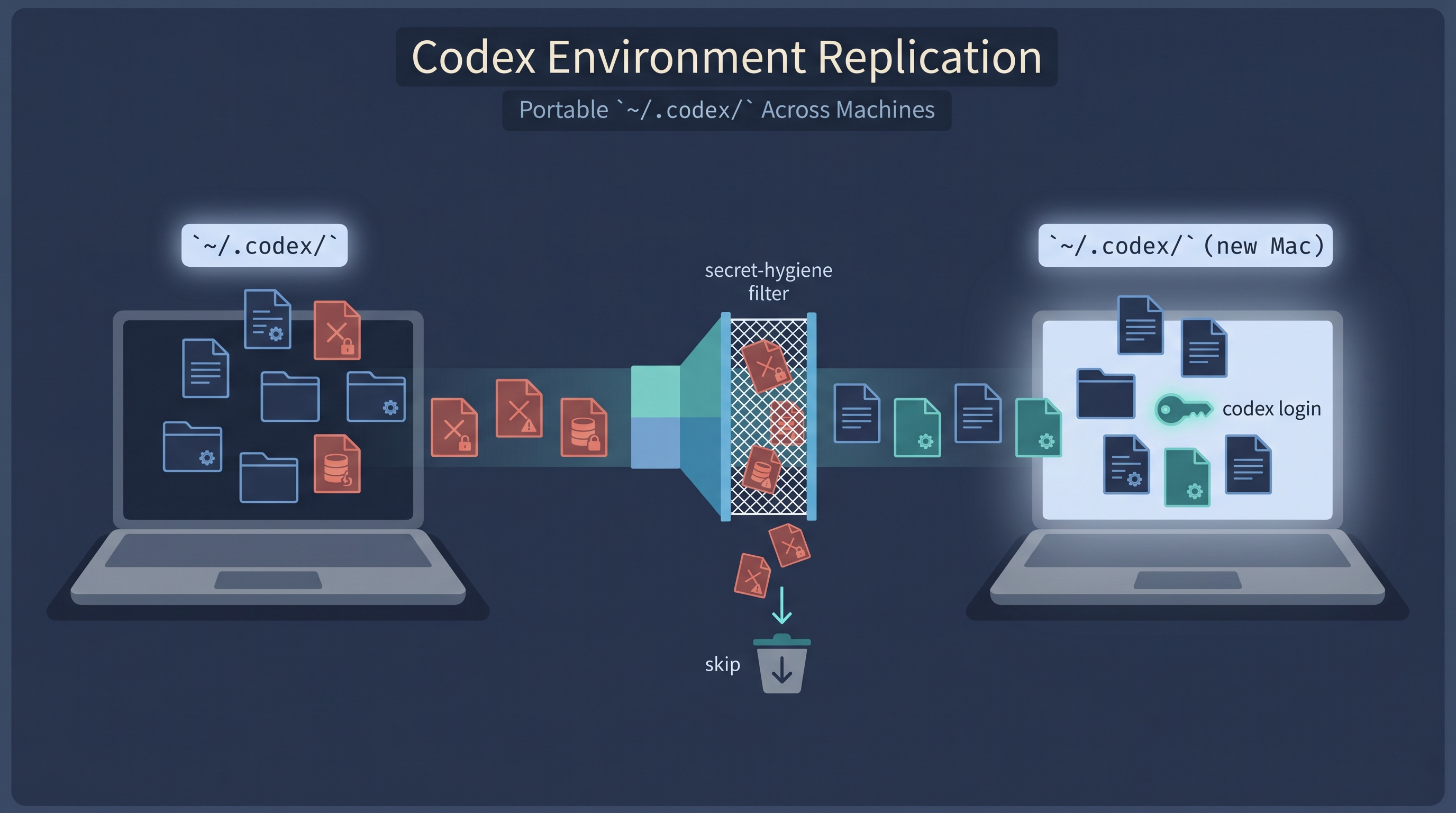
Codex CLI accumulates as much state as Claude Code does — a global AGENTS.md, custom agents, hooks, rules, memories, marketplace registrations, and a thicket of trusted project paths inside config.toml. Moving that to a new Mac is brittle if you rsync -a ~/.codex/ blindly, because half of ~/.codex/ is live SQLite WAL, OAuth tokens, and machine-bound IDs. This entry documents a focused pair of scripts — codex-export.sh and codex-bootstrap.sh — that mirror the well-known Claude Code replication scripts and ship the portable bits while quarantining the dangerous ones.
*Source: Companion scripts to ~/.claude/claude-code-export.sh / claude-code-bootstrap.sh (documented in Claude Code Environment Replication) |
Manual rsync alternative: Copy My Codex Setup | Multi-tool walkthrough: New-Mac Migration — Codex + Claude Code | OpenAI Codex CLI docs | BSD vs GNU sed in-place differences* |
Quick Start — Replicate in 3 Steps
SOURCE MACHINE                    TARGET MACHINE
──────────────                    ──────────────
Step 1: Export                    Step 2: Bootstrap
  bash ~/.codex/                    bash codex-bootstrap.sh
    codex-export.sh
        │                         Step 3: codex login
        │  ~/codex-export/          (populates Keychain entries
        └──── copy via USB/SCP ──►   "Codex Safe Storage" / "Codex Key";
             AirDrop/Dropbox         creates fresh ~/.codex/auth.json)
Step 1 — Export (on source machine):
bash ~/.codex/codex-export.sh
# Default output: ~/codex-export/
# Roughly 100 KB. Contains AGENTS.md, RTK.md, config.toml, hooks.json,
# agents/, hooks/, rules/, selected memories/*.md, plus the bootstrap script.
Step 2 — Bootstrap (on target machine):
npm install -g @openai/codex            # if not present
bash codex-bootstrap.sh                 # auto-detects export dir
# Backs up any existing ~/.codex/config.toml and hooks.json with timestamp,
# rewrites /Users/oreo → $HOME inside both, copies the rest, runs a
# dependency check, prints plugin install commands.
Step 3 — Re-authenticate and re-install plugins (inside Codex):
codex login                              # creates auth.json + Keychain entry

# Inside Codex CLI:
/plugin marketplace add anthropics/claude-plugins-official
/plugin marketplace add kepano/obsidian-skills
/plugin marketplace add openai/codex-plugin-cc
/plugin marketplace add Lum1104/Understand-Anything
/plugin marketplace add lingfengQAQ/webnovel-writer

/plugin install superpowers@claude-plugins-official
/plugin install pr-review-toolkit@claude-plugins-official
/plugin install codex@openai-codex
# ... (full list printed by the bootstrap script)
That’s it. The portable layer is replicated; the machine layer (auth, sessions, caches, live DBs) rebuilds itself on first run.
Why a Dedicated Codex Script (and Not Just rsync)
Half of ~/.codex/ is not safely portable, and the failure modes are subtle:
Sizes below are from one inspected machine (Codex CLI 0.134.0, May 2026); your ~/.codex/ will differ in absolute numbers but the shape holds.
| Subtree | Observed size | Why you must NOT blindly copy |
|---|---|---|
auth.json |
~4 KB | On this machine its top-level keys were auth_mode, OPENAI_API_KEY, tokens, last_refresh. Whatever it holds in your version, treat it as credential material — re-login on the new Mac instead |
logs_*.sqlite{,-shm,-wal} |
228 MB | Live SQLite + WAL — copying mid-write produces a corrupt DB |
goals_*.sqlite{,-shm,-wal} |
~few MB | Same problem |
sessions/ |
156 MB | Per-machine session transcripts; not portable knowledge |
memories/skills/.system/ |
~10 MB | Bundled OpenAI skills (imagegen, openai-docs, skill-creator, etc.) — Codex regenerates these on first run |
tmp/, cache/, shell_snapshots/, node_repl/ |
varies | Runtime scratch; rebuilds itself |
installation_id |
36 B | Device-bound UUID; carrying it to a new Mac confuses telemetry |
.codex-global-state.json |
~10 KB | Last-CWD and other per-machine UI state |
*.bak*, *.tmp, *.pre-* |
varies | Old backups; the inspected setup had five stale config.toml.bak-* files alone |
The “manual rsync into a .review-me/ quarantine” approach (documented in Copy My Codex Setup) works but requires you to remember every dangerous path. The script encodes the exclusion list once and tests it.
What the Scripts Actually Do
codex-export.sh                          codex-bootstrap.sh
───────────────                          ──────────────────
1. Hard-refuse target=$CODEX_DIR         1. Pre-flight: codex CLI exists
2. Hard-refuse target=$HOME              2. Backup existing config.toml /
3. Hard-refuse target inside CODEX_DIR      hooks.json → *.pre-bootstrap-{TS}
4. Require .codex-export-marker          3. sed: /Users/oreo → $HOME
   (or empty dir) before rm -rf             (escaped to handle & \ |)
5. Copy AGENTS.md, RTK.md                4. Copy AGENTS.md, RTK.md
6. Copy config.toml, hooks.json          5. Copy agents/, hooks/ (+x bit),
7. Copy agents/ (skip symlinks)             rules/, memories/
8. Copy hooks/ (preserve +x)             6. Scan copied hooks for residual
9. Copy rules/                              /Users/oreo refs → warn
10. Selectively copy memories/           7. Dependency check
    (skip skills/, tmp/, log/, cache/,   8. Print /plugin install commands
    .system/, node_repl/, *.sqlite*,     9. Checklist that ends with
    *.log, *.lock, installation_id)         "codex login"
11. Regex-scan for secret patterns
    (sk-*, ghp_*, gho_*, ghs_*, AKIA*,
    BEGIN PRIVATE KEY, xoxb-*) →
    require typed CONTINUE to proceed
12. Final belt: verify auth.json is
    NOT in export dir → delete if it
    somehow slipped through
Total exported size on the inspected machine: 100 KB of portable behavior, vs. several hundred MB of ~/.codex/ runtime state (sessions, SQLite logs, bundled system skills, caches) that the exclusion list correctly skips.
The /Users/oreo → $HOME Rewrite
config.toml and hooks.json contain absolute paths burned into them by Codex itself:
[projects."/Users/oreo/Dropbox/cs286"]
trust_level = "trusted"

[hooks.state."/Users/oreo/.codex/hooks.json:pre_tool_use:0:0"]
trusted_hash = "sha256:5447ee1912f3..."
If the new Mac has a different username (or you decide your new home should be /Users/weihao not /Users/oreo), every one of those paths breaks. The bootstrap fixes this in-place after the copy.
Why sed and not a TOML parser
The Claude bootstrap uses jq for settings.json because JSON has a universally-installed structural editor. TOML does not. taplo, dasel, tq, tomlq — all niche, none guaranteed on a vanilla Mac. So the bootstrap falls back to sed, with one extra guarantee: /Users/oreo only appears inside path-like string keys and values in this user’s config.toml/hooks.json — both project path table headers ([projects."/Users/oreo/..."]), hook state table headers ([hooks.state."/Users/oreo/.codex/hooks.json:..."]), and the source = "..." and similar value strings. No prose, no embedded data, no risk of clobbering an unrelated literal. A literal string substitution is safe under that invariant.
Why the escape helper matters
Raw sed "s|/Users/oreo|$HOME|g" has three failure modes if $HOME contains a sed metacharacter:
&in$HOME→ sed treats it as “the matched text,” producing garbage\in$HOME→ sed eats it as an escape|in$HOME→ ends the pattern early (since|is the chosen delimiter)
Realistic Mac usernames don’t contain those, but the migration script is exactly the moment a Q-with-a-weird-username would discover it. The escape helper costs three lines and prevents a class of corruption:
escape_sed_repl() {
  printf '%s' "$1" | sed -e 's/[\\&|]/\\&/g'
}
HOME_ESCAPED=$(escape_sed_repl "$HOME")
Round-trip test with HOME=/Users/a&b: the bootstrap correctly produces path = "/Users/a&b/Desktop", not the literal-&-substitution garbage.
BSD sed vs GNU sed -i
The classic gotcha:
if [[ "$OSTYPE" == "darwin"* ]]; then
  sed -i '' "s|...|...|g" "$f"   # BSD requires the empty arg
else
  sed -i    "s|...|...|g" "$f"   # GNU rejects the empty arg
fi
Mac ships BSD sed. Linux ships GNU sed. The $OSTYPE branch is borrowed verbatim from the Claude bootstrap script — it’s the standard pattern.
Hook Trust Hashes — A Detail That Bit Me
Codex’s config.toml stores trusted_hash entries associated with hook definitions:
[hooks.state."/Users/oreo/.codex/hooks.json:pre_tool_use:0:0"]
trusted_hash = "sha256:5447ee1912f3f5adb8aa..."
The exact hash input is internal to Codex, but the practical observation is consistent: if the relevant hook content changes (file body, command string, or hooks.json entry), the stored hash no longer matches. So when the bootstrap rewrites /Users/oreo → /Users/weihao inside hooks.json, the next hook fire detects the mismatch and prompts you to re-trust. This is not a bug. The checklist printed by codex-bootstrap.sh warns about this explicitly:
[ ] If hook trust hashes mismatch, re-trust on first hook fire
If the new Mac has the same username (oreo), sed is a no-op, content is identical, hashes still match. Nothing to do.
The bootstrap deliberately does not rewrite the actual hook scripts in ~/.codex/hooks/, because changing them would invalidate trust hashes for hook scripts themselves and break the trust-on-first-use model. Instead it scans copied hooks for residual /Users/oreo references and warns:
⚠️  hooks contain hard-coded /Users/oreo paths: my-old-hook.sh
   Edit them manually to use $HOME or this machine's username.
For the canonical RTK rewrite hook (the only one in this setup), there are no hard-coded /Users/oreo references — it uses $PATH lookups and stdin parsing. Clean.
Safety Mechanisms in Detail
The first version of the export script ate a Codex review pointing out five issues. Here’s what got hardened:
Refuse Guards
case "$EXPORT_DIR" in
  "$CODEX_DIR"|"$CODEX_DIR/"|"$HOME"|"$HOME/"|"/"|"")
    echo "ERROR: Refusing to use \"$EXPORT_DIR\" as export target."
    exit 1
    ;;
esac
case "$EXPORT_DIR/" in
  "$CODEX_DIR/"*) echo "ERROR: target inside CODEX_DIR. Refusing."; exit 1 ;;
esac
The footgun this prevents: someone types bash codex-export.sh ~/.codex by mistake. The previous version would have happily checked for config.toml (found one), then rm -rf ~/.codex/. The hardened version refuses outright.
Marker File
The previous “is this a prior export” check was: “directory contains config.toml OR AGENTS.md OR is empty”. Too loose — your actual ~/.codex/ contains both. The hardened version writes a dotfile marker:
EXPORT_MARKER=".codex-export-marker"
# Only auto-rm if marker present or dir empty:
if [ -f "$EXPORT_DIR/$EXPORT_MARKER" ] || [ -z "$(ls -A "$EXPORT_DIR" 2>/dev/null)" ]; then
  rm -rf "$EXPORT_DIR"
fi
# After mkdir, drop the marker so the next run recognizes us:
printf 'codex-export marker (do not delete)\n' > "$EXPORT_DIR/$EXPORT_MARKER"
Secret Scan with Typed Confirmation
SECRET_RE='(sk-[A-Za-z0-9_-]{20,}|ghp_[A-Za-z0-9]{20,}|gho_[A-Za-z0-9]{20,}|ghs_[A-Za-z0-9]{20,}|xoxb-[A-Za-z0-9-]{20,}|AKIA[0-9A-Z]{16}|-----BEGIN[ A-Z]+PRIVATE KEY-----)'
HITS=$(grep -rIlE "$SECRET_RE" "$EXPORT_DIR" 2>/dev/null || true)
if [ -n "$HITS" ]; then
  echo "  ⚠️  POSSIBLE SECRETS in:"
  printf '    %s\n' "$HITS"
  echo "  Default action: ABORT. Type exactly CONTINUE to proceed anyway."
  read -r reply || true
  [ "$reply" != "CONTINUE" ] && exit 2
fi
A blank-Enter does not continue. You have to type CONTINUE exactly. This is a defense-in-depth catch — auth.json is already skipped by name, but if a future Codex version writes a key into memories/ or any other file, the scan catches it.
After Bootstrap — Things the Scripts Don’t Touch
| Concern | Why scripts don’t migrate it | What to do |
|---|---|---|
Codex Keychain material (the inspected setup showed entries Codex Safe Storage / Codex Key; names may vary by version) |
The scripts deliberately don’t touch Keychain — credentials should be rebuilt through the official login flow, not copied as files | codex login on the new Mac creates the appropriate Keychain entry |
Claude Code credentials (the inspected setup showed Claude Code-credentials) |
Same | claude login on the new Mac |
GitHub PAT in ~/.zshrc |
Tokens in plain text are a separate security problem | Revoke + reissue + store in gh auth login or 1Password |
| VS Code extensions | Lives outside ~/.codex/ |
code --list-extensions > ext.txt on old, xargs -L1 code --install-extension < ext.txt on new |
| Homebrew packages | Lives outside ~/.codex/ |
brew bundle dump --file=~/Brewfile, then brew bundle install |
| npm globals | Lives outside ~/.codex/ |
npm ls -g --depth=0 → manual reinstall |
| SSH private keys | ~/.ssh/ is sensitive |
Encrypted transfer (e.g., AirDrop, encrypted USB); never email |
config.toml trusted project paths |
Paths to your ~/Dropbox, ~/Desktop projects on old Mac |
Bootstrap rewrites /Users/oreo → $HOME for you, but if your project layout itself differs on the new Mac, edit config.toml after bootstrap |
Real-World Use Cases
1. Hardware Upgrade (Author’s Case)
The event that birthed these scripts: macOS Force Quit on an 18 GB Mac showed Code (paused): 839.37 GB and Docker Desktop: 143.97 GB — values that exceed total RAM by 50×, so they’re aggregated virtual-memory / cumulative-dirty-write counters, not live RSS. The underlying cause: macOS diagnostic reports (Claude_2026-05-26-174539.diag and Codex_2026-05-24-020351.diag) showed both the Anthropic Claude macOS app (/Applications/Claude.app/) and the OpenAI Codex macOS app (/Applications/Codex.app/) dirtying ~2 GB of file-backed memory per day, stuck in uv_cancel (libuv async I/O — both apps are Electron-based). Decision: upgrade to a 48 GB Mac, but only after building a non-destructive migration path. Hence these scripts.
2. Multi-Machine Researcher
A faculty member with a desktop in the office, a laptop for travel, and a server at home wants Codex to behave identically across all three. The export script captures their global AGENTS.md, calibrated review-gate rules, custom agents, and curated memories; the bootstrap puts them everywhere. Re-auth happens once per machine — Keychain doesn’t sync — which is exactly what you want for credential isolation.
3. Classroom Image / Lab Onboarding
A TA can run codex-export.sh once on a clean teaching Mac (no real credentials), commit the export to a private repo, and have students run codex-bootstrap.sh on day one. Students get the instructor’s standardized AGENTS.md, default agents, and memories — but each student does their own codex login so credentials never cross.
4. Recovery After Disk Reformat
After rm -rf ~/.codex/ (intentional or otherwise), the export bundle in Dropbox/Time Machine restores everything except auth. Recovery time: ~2 minutes vs. ~2 hours rebuilding AGENTS.md and re-curating memories from scratch.
How the LearnAI Team Could Use This
Standardize the student stack. A LearnAI instructor maintains a “blessed” AGENTS.md that teaches Codex how to behave in pedagogically-useful ways — verbose explanations, no skip-ahead, mandatory code-review gate. They run codex-export.sh against that blessed setup and ship the bundle as a course resource. Students bootstrap their own ~/.codex/ from it in one command, then codex login with their own API key. Every student inherits the same baseline behavior without anyone hand-copying files.
Reproducible research environments. When a paper says “we used Codex with this AGENTS.md,” that claim is only reproducible if the AGENTS.md is shippable. The export bundle is exactly that artifact — small (100 KB), inspectable (plain markdown + TOML), secret-free (guarded by regex scan + name-based exclusion). Future students reviewing the project can replicate the exact Codex configuration the original authors used.
Lab continuity across hires. A graduate student leaves; their hand-tuned Codex configuration disappears with their laptop. With the export script in place, the lab keeps a copy. New students get to start from a researched baseline instead of a blank AGENTS.md. The hooks, rules, and curated memories that took months to develop don’t evaporate with personnel turnover.
Teaching the migration problem itself. Walking students through these scripts is a small but rich worked example for a CS class on systems / shell programming: portability (BSD vs GNU sed), security (secret scanning, refuse guards), trust models (hook trust hashes), API design (marker files, idempotence). Concrete, ~200 lines, and motivated by a real problem they’ll face.
Related Entries
- Claude Code Environment Replication — The sibling script pair for
~/.claude/. Same pattern, different secret surface. - Copy My Codex Setup — Manual rsync-and-quarantine alternative when you want maximum control over what crosses machines.
- New-Mac Migration — Codex + Claude Code — The 90-minute orchestration walkthrough that ties Codex + Claude Code + the
/checkpoint⇄/resumehandoff into one ordered path. - Claude Code + Codex Handoff Workflow — Why having Codex configured the same way on both your machines matters for handoff continuity.
- Cross-Model Code Review — Codex caught five issues in the first version of these very scripts. This is why the review gate is non-negotiable.