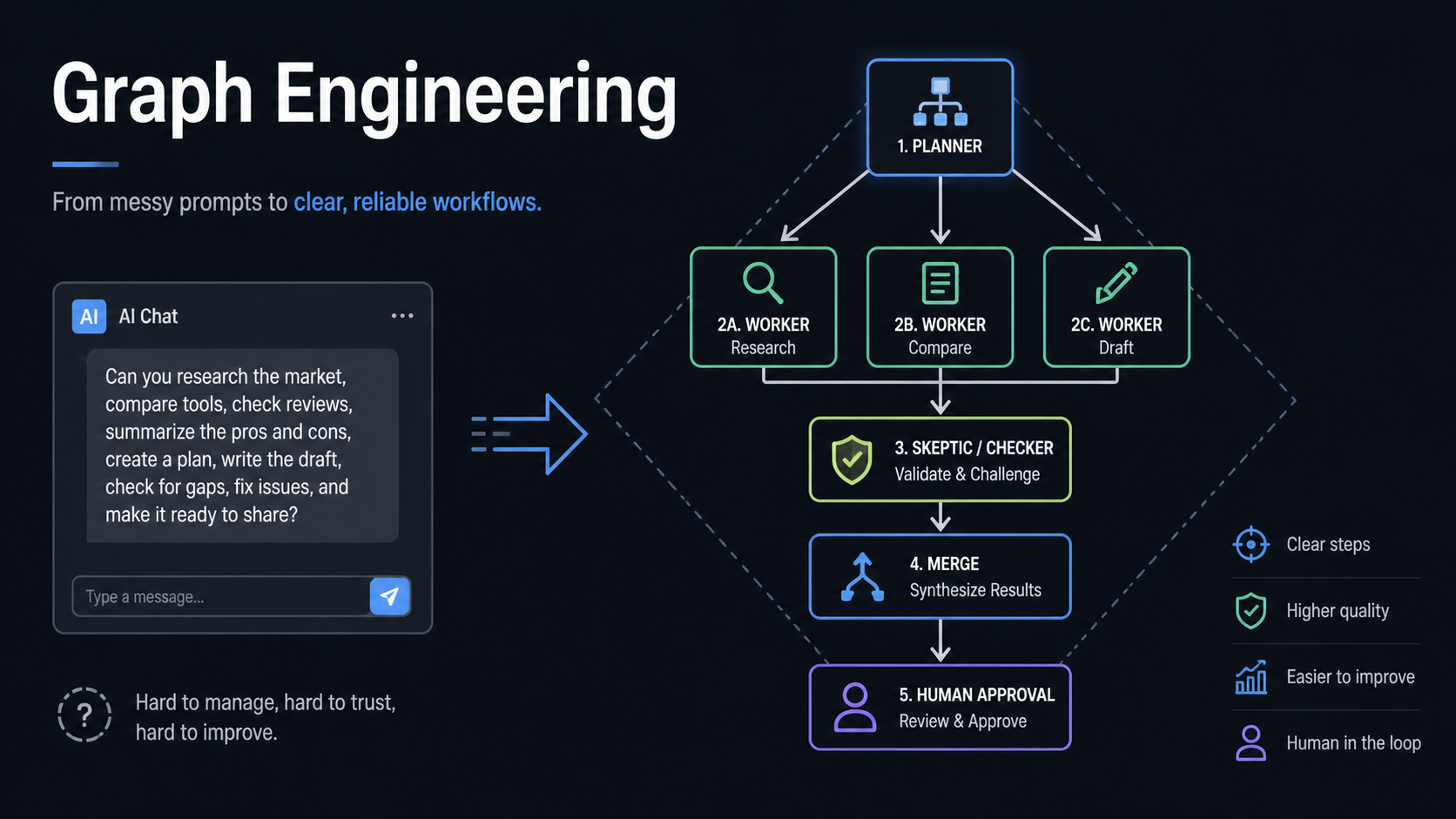
Graph engineering is a useful teaching label for the move from asking one AI chat for one answer to designing the workflow around AI: jobs, arrows, shared state, checks, merges, and human approval. The term is still loose and social-media-shaped, so the important part is not the label. The important part is learning to manage AI work as an auditable process instead of trusting one polished blob of text.
Source: Greg Isenberg — Why Graph Engineering will 10x your Claude/Codex, August 3, 2026; LangChain — 3 Years of Graph Engineering with LangGraph; Anthropic — How we built our multi-agent research system; Microsoft GraphRAG docs; AutoGen GraphFlow docs
What changed in this update
The earlier version of this page, and the stable URL slug, treated graph engineering mainly as a viral term around Karpathy loops, LangGraph, agent memory, and knowledge graphs. This update broadens the page instead of creating a duplicate. The caution still holds: there is no verified Anthropic announcement that “graph engineering” is a formal discipline, and the circulated social-media framing should not be treated as authority.
Greg Isenberg’s August 3, 2026 video is useful because it turns the idea into a beginner-friendly workflow model. A useful way to teach the video’s framing is:
| Layer | Practical question |
|---|---|
| Prompt engineering | How do I ask the AI better? |
| Context engineering | What information should the AI see? |
| Knowledge graph | How do facts, entities, claims, and sources connect? |
| Agent graph | How should work move between steps, checks, and approvals? |
For LearnAI, the fourth row is the main lesson. Students should not only learn how to ask a model for an answer. They should learn how to design the work so the answer is produced through visible intermediate artifacts.
Chat vs graph
A chat-only workflow compresses too much responsibility into one model pass:
question
  -> model decides what matters
  -> model researches
  -> model interprets
  -> model recommends
  -> model grades its own confidence
That may be fine for a small question. It is fragile when the answer affects code, research direction, customer communication, grading, or business decisions.
A graph workflow separates the jobs:
question
  -> planner
  -> researcher A
  -> researcher B
  -> researcher C
  -> skeptic / verifier
  -> merger / synthesis
  -> human approval
The final output may still be a memo, answer, code change, or post. The difference is that the work behind it becomes inspectable.
The diamond pattern
The most reusable beginner pattern is a diamond:
                         planner
                            |
          +-----------------+-----------------+
          |                 |                 |
 customer researcher  competitor researcher  distribution researcher
          |                 |                 |
          +-----------------+-----------------+
                            |
                         skeptic
                            |
                          merge
                            |
                      human decision
Use it when a task has multiple independent angles and the answer should be checked before it matters. A startup idea review, literature scan, support escalation, content package, or coding change can all fit this shape.
The key design move is separating workers from checkers. A lot of AI work fails because the same model produces the answer and then certifies the answer. In a graph, checking is its own job.
Knowledge graph vs agent graph
These two meanings of “graph” often get mixed together:
| Type | What it represents | Example |
|---|---|---|
| Knowledge graph | Relationships in information | Customer -> company -> product -> support issue -> feature owner |
| Agent graph | Movement of work | Classify -> research -> draft -> verify -> approve |
Microsoft’s GraphRAG is a knowledge-graph/RAG example: it extracts entities, relationships, and community-level summaries from text, builds graph/community structure, and uses that structure during retrieval. LangGraph and AutoGen GraphFlow are examples of graph/workflow orchestration for agentic systems: they represent control flow through nodes, edges, state, conditional branches, loops, and human gates.
Good systems can use both. A support workflow might use a knowledge graph to understand the customer/product relationship, then an agent graph to decide whether to answer, escalate, refund, or ask a human.
Three implementation levels
Do not start by installing a framework. Start by drawing the work.
| Level | How to run it | When it is enough |
|---|---|---|
| 1. Manual graph | Draw jobs and arrows in Excalidraw, tldraw, Obsidian Canvas, or a whiteboard | First run of a new workflow |
| 2. File graph | Use Claude Code or Codex with files like plan.md, customer.md, competitors.md, review.md, recommendation.md |
Repeatable personal/team workflow with an audit trail |
| 3. Orchestrated graph | Use LangGraph, AutoGen GraphFlow, workflow automation/orchestration tools such as n8n or Make, or small scripts | Production workflow with state, retries, tools, approvals, and persistence |
The file graph is the best teaching step. It makes state concrete:
graph-workflow/
  plan.md
  customer-research.md
  competitor-research.md
  distribution-research.md
  skeptic-review.md
  recommendation.md
  decision-log.md
Students can inspect each file, compare claims to evidence, and see where the human decision enters. That is much harder when everything lives inside one chat transcript.
When to use graph engineering
Use a graph when the work has:
- multiple steps
- multiple sources
- parallelizable branches
- explicit checks
- risk or approvals
- reusable state
- a final output that should be audited later
Skip it when the work is short, linear, and easy to verify. Summarizing a small email does not need a graph. Reviewing a repo change, preparing a research memo, triaging support risk, or deciding whether to launch an idea often does.
Coding-agent version
For Claude Code or Codex, a simple graph can look like this:
Q request
  -> plan/spec
  -> implementation
  -> tests
  -> independent review
  -> fix review issues
  -> final verification
  -> human approval before push/deploy
That is already how reliable agent work feels in practice. The coding model writing code is only one node. Planning, testing, browser inspection, diff review, and push approval are separate nodes with different failure modes.
This is also why graph engineering connects to harness engineering. By harness, I mean the surrounding tools, files, policies, review gates, and state that let the model act. The graph is the shape of the work moving through that harness.
Teaching model for students
Use this as a lab:
- Give students one broad task: “Should we build an AI study assistant for first-year CS students?”
- Have them ask one chat for an answer.
- Have them draw the diamond graph.
- Assign each branch a file.
- Require a skeptic file that attacks unsupported claims.
- Require a final recommendation that cites which branch each claim came from.
- Ask students which version another person could audit tomorrow.
The learning outcome is not “students can use LangGraph.” The learning outcome is:
Students can turn AI assistance into a traceable workflow.
That matters because AI fluency is not just prompt fluency. It is knowing where evidence, judgment, and responsibility sit in the process.
Important caveats
- The term is not settled. Treat “graph engineering” as a useful map, not a formal standard.
- Bigger graphs are often worse. More agents can mean more coordination cost, repeated mistakes, and false confidence.
- Do not automate a workflow you do not understand. If the manual graph does not improve quality, automation will only scale the confusion.
- Human gates belong where mistakes are expensive. Public posts, customer emails, refunds, code deploys, grading, and production data need stricter approval than private drafts.
- A graph is not a substitute for verification. It gives you places to put verification; it does not guarantee verification happened.
Best LearnAI use
This page should sit between:
- AI Infrastructure Literacy — why students need to see files, tools, diffs, and evidence
- Agents Need Control Flow — why prompts alone are not enough for reliable agents
- LangGraph Stateful Business Workflows — runnable recipes once students understand the shape
- 7 Agent Architectures — where graph/workflow engines fit in the broader architecture ladder
The blunt takeaway: prompt engineering helps you talk to AI. Graph engineering helps you manage AI work.