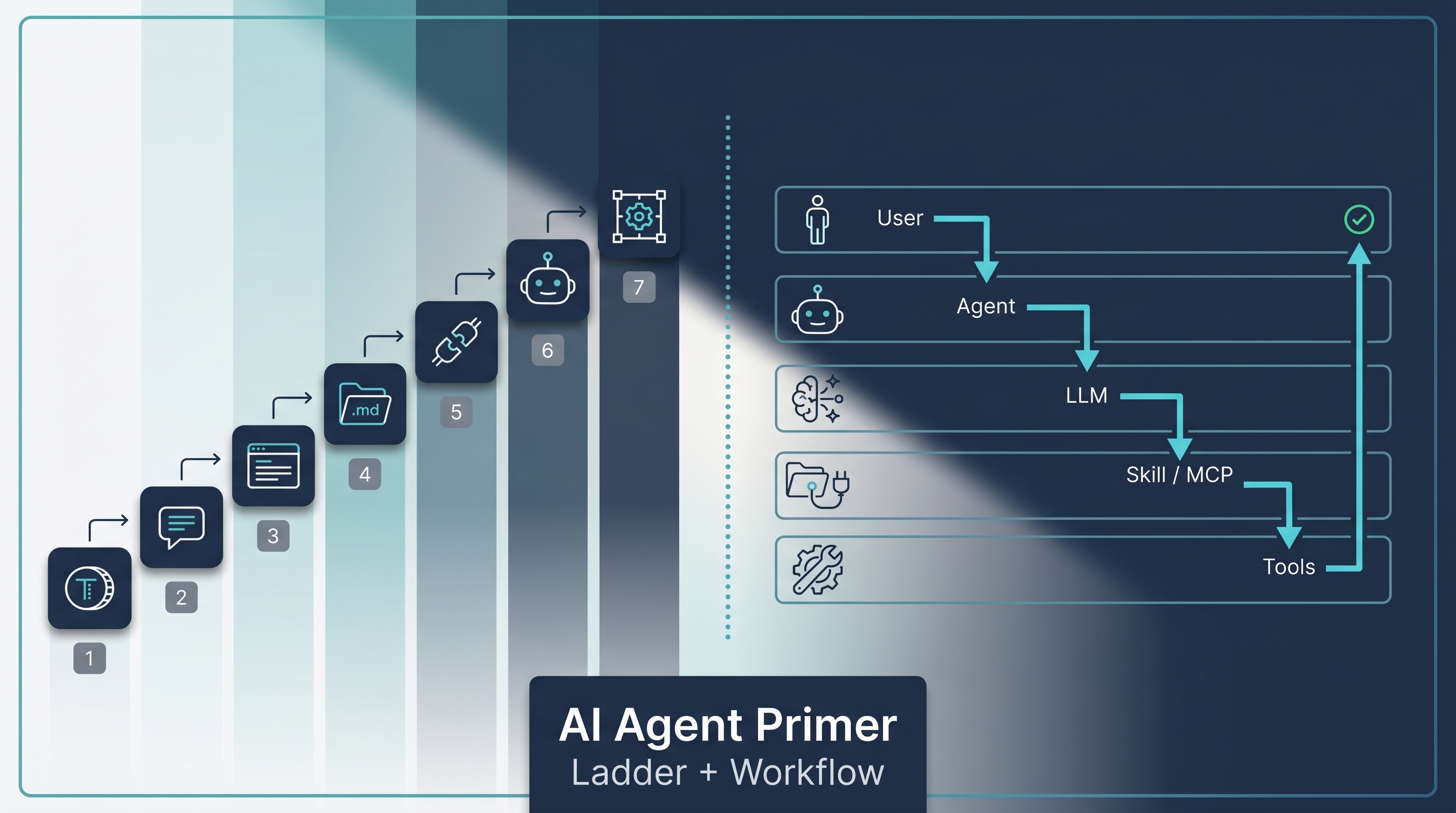
A short, beginner-facing teaching map for the AI-agent vocabulary that newcomers run into the moment they start reading about Claude Code, Codex, AutoGPT, or “agents” in general. Built from two complementary popular explainers that surfaced in Chinese AI media in early 2026: the 7-term automation ladder (Token → Harness) and the 18-step swimlane workflow (User → Agent → LLM → Skill → MCP → Tools). Neither is a canonical taxonomy — they’re two angles on the same beginner question, “what are all these words and how do they fit together?” This entry serves as the on-ramp; the deep dives live in the wiki entries linked from each layer.
| *Source: Douyin: 知希AI — “AI 七个词, 你真的搞懂了几个?” (April 21, 2026) — the 7-term ladder | Douyin: 程序员楼哥 — “一张图看懂 AI Agent 全流程” (January 13, 2026) — the 18-step swimlane (pages 1–4 of a 15-page deck used here; remaining 11 pages not consulted)* |
Read this entry as a teaching map, not a standard. The two frameworks below are popular explainer artifacts, not formal definitions. Where each term has a precise meaning, the relevant deep-dive wiki entry is linked.
View 1 — The 7-Term Automation Ladder
The first explainer (知希AI) frames seven core terms as a ladder of increasing automation. Each rung is a layer you can adopt; the higher you go, the more the system runs without you watching it.
| # | Term | One-line | Deep-dive entry |
|---|---|---|---|
| 1 | Token | The unit a model reads and writes; every interaction burns tokens | Caveman Token Compression |
| 2 | Prompt (提示词) | The instructions you give the model for one task — the clearer, the better | Prompt Master, Anti-Sycophancy Prompt |
| 3 | Context (上下文) | The current conversation’s workspace; close the window and it’s gone | Claude Code Context Management & CLAUDE.md, Claude Code Context Fork |
| 4 | Skill | A reusable, file-based operation manual the model can re-load on demand | How Anthropic Uses Skills — Thariq’s 9-Category Framework, Claude Code Tips & Context Engineering, Addy Osmani, Matt Pocock, Karpathy |
| 5 | MCP | An open connection-standard protocol between models and external tools/data — popularly shorthanded as “plugins for the AI” | Anthropic Managed Agents — Decoupling the Brain from the Hands, alphaXiv MCP — ArXiv Search Inside Claude Code |
| 6 | Agent | A model + planner + memory + tool-use loop that can execute multi-step tasks autonomously | Seven Agent Architectures, Agentic AI Engineer Roadmap 2026 |
| 7 | Harness | The surrounding scaffold/runtime that runs an agent reliably — context limits, tool gating, verification loops, error recovery | Harness Engineering — The Real Bottleneck Isn’t the Model, Agents Need Control Flow |
Two Pre-empts Before You Quote This Ladder
- “MCP = plugins” is a useful shorthand, not the definition. MCP is an open protocol that standardizes how models, tools, and data sources talk to each other — closer to “USB-C for AI” than to “browser plugins.” The plugin-like behavior is one consequence of the protocol.
- “Harness” is not a universal formal layer in every framework — it’s the engineering discipline of building the scaffold around the model. Different stacks (LangChain, Claude Code, Codex, OpenHarness) implement the harness differently.
View 2 — The 18-Step Swimlane Workflow
The second explainer (程序员楼哥) takes the same vocabulary and shows it moving: an 18-step swimlane flowchart of how a single user query traverses six lanes before a result comes back.
┌─────────┐  ┌──────────┐  ┌──────────┐  ┌────────┐  ┌──────┐  ┌─────────┐
│  User   │  │  Agent   │  │   LLM    │  │ Skill  │  │ MCP  │  │  Tools  │
└────┬────┘  └────┬─────┘  └────┬─────┘  └───┬────┘  └──┬───┘  └────┬────┘
     │            │              │             │           │           │
   query  ─────▶  receive  ──▶  intent       │           │           │
     │            │              │             │           │           │
     │       load context+skill  │             │           │           │
     │            │              │             │           │           │
     │            │  ────────▶  plan          │           │           │
     │            │              │             │           │           │
     │       dispatch  ────────────────────▶  invoke ───────────▶  run
     │            │              │             │           │           │
     │            │              │             │           │       result
     │            │  ◀────────  observe ◀───────────────────────────────
     │            │              │             │           │           │
     │            │  ────────▶  next step / verify ──▶ ...               │
     │            │              │             │           │           │
     │  ◀───── final answer                                              │
The 18 steps elaborate this with explicit observation, error retry, and verification loops between the LLM and the tool layer. The takeaway: a single “agent run” is not one model call — it’s a dozen-plus orchestrated calls across six distinct lanes.
Per-Lane Role, in One Line
The six swimlanes:
| Lane | Job | What it isn’t |
|---|---|---|
| User | Express intent | Not responsible for picking tools or steps |
| Agent | Plan, dispatch, remember, verify | Not the brain — borrows the LLM for reasoning |
| LLM | Reason, write, classify, decide | Not a planner or executor; just a stateless engine |
| Skill | Hold reusable procedures the agent can re-load | Not a one-shot prompt; a file/folder the agent reads on demand |
| MCP | Standardize tool-agent connectivity | Not a tool itself; the protocol that lets tools plug in |
| Tools | Take concrete action (web search, code run, DB query, API call) | Not autonomous; the agent picks and calls them |
(Prompt isn’t a lane in this view — it’s the artifact passing between User and Agent. See the ladder above for where Prompt sits.)
How the Two Views Complement
The two explainers are not competing taxonomies — they answer different questions:
| Question | Best view |
|---|---|
| “What level of automation should I aim for?” | Ladder — Token → Harness shows you the next rung |
| “How does a single agent run actually execute?” | Flowchart — shows the roles interacting in real time |
| “What does each word mean in isolation?” | Either view’s glossary works as an entry point |
| “Where do I go to learn this concept deeply?” | Click through to the linked wiki entry |
Both views collapse onto the same underlying truth: modern agent systems are layered, and each layer has a job that the others can’t do well. Choose the right layer for the right problem, and the system runs; over-engineer the wrong layer, and it doesn’t.
What the Ladder Tells You About Your Own Setup
A diagnostic question for each rung:
- Token: Do you know roughly what tokens your common workflows burn? If not, start there.
- Prompt: Do you have a default system prompt that you trust on important work?
- Context: When sessions end, do you lose state you wanted to keep?
- Skill: Is there work you do the same way ≥3 times? It should be a skill.
- MCP: Are you copying data in/out of the agent manually? Look for an MCP integration.
- Agent: Is the agent making plans, or are you?
- Harness: When the agent fails silently, do you find out?
The further down the list a “no” appears, the more leverage you’ll get from investing there next.
How LearnAI Team Could Use This
- Onboarding gateway — assign this entry as the first reading in any AI module before going deep. The 7-term ladder is short enough that even non-engineering students can absorb it in 10 minutes.
- Glossary check-in — quiz students after the first week: define each term, name the deep-dive wiki entry that owns it. Misses identify exactly where the curriculum needs reinforcement.
- Diagnostic for project advising — when a student says “my agent isn’t working,” walk down the ladder ask: which rung is the failure on? Token cost? Prompt vagueness? Missing skill? No verification?
- Cross-curriculum integration — non-CS students (bio, finance, design) benefit most from the 6-lane flowchart, which shows that “AI” is not one thing but a system of cooperating parts.
- Companion exercise to harness engineering module — read this entry first, then dive into Harness Engineering and Agents Need Control Flow.
Real-World Use Cases
- Stakeholder briefings — when a PM or executive asks “what is an agent?”, the ladder + flowchart together cover 80% of the answer in a single page.
- Engineering interviews — candidates who can place themselves on the ladder (and explain why their preferred layer matters) tend to ship reliable agent systems.
- Tool evaluation — when a new AI tool is announced, map it onto the ladder: which rung does it improve? If it’s not obvious, the tool probably isn’t differentiated.
- Cross-team alignment — when product / engineering / data each mean a different thing by “agent,” this glossary normalizes the vocabulary before debate.
- Self-audit — solo engineers diagnose which rung of the ladder their workflow is stuck on and what investment unlocks the next rung.
Links
- Source explainer 1 (7-term ladder): Douyin post by 知希AI (April 21, 2026)
- Source explainer 2 (18-step swimlane): Douyin post by 程序员楼哥 (January 13, 2026; pages 1–4 of a 15-page deck were consulted)
- Deeper reading by layer: see the per-term link column in the ladder table above